
TABLED1
Bulk Data Entry Defines a tabular function for use in generating frequency-dependent and time-dependent dynamic loads.
Format
| (1) | (2) | (3) | (4) | (5) | (6) | (7) | (8) | (9) | (10) |
|---|---|---|---|---|---|---|---|---|---|
| TABLED1 | TID | XAXIS | YAXIS | FLAT | |||||
| x1 | y1 | x2 | y2 | x3 | y3 | x4 | y4 | ||
| x5 | y5 | etc. | etc. | etc. | etc. | etc. | etc. |
Alternative Format for SCALE and OFFSET
| (1) | (2) | (3) | (4) | (5) | (6) | (7) | (8) | (9) | (10) |
|---|---|---|---|---|---|---|---|---|---|
| TABLED1 | TID | XAXIS | YAXIS | FLAT | |||||
| "SCALE" | scale_x | scale_y | |||||||
| "OFFSET" | offset_x | offset_y | |||||||
| x1 | y1 | x2 | y2 | x3 | y3 | x4 | y4 | ||
| x5 | y5 | etc. | etc. | etc. | etc. | etc. | etc. |
Example 1
| (1) | (2) | (3) | (4) | (5) | (6) | (7) | (8) | (9) | (10) |
|---|---|---|---|---|---|---|---|---|---|
| TABLED1 | 32 | ||||||||
| -3.0 | 6.9 | 2.0 | 5.6 | 3.0 | 5.6 | ENDT |
Example 2
| (1) | (2) | (3) | (4) | (5) | (6) | (7) | (8) | (9) | (10) |
|---|---|---|---|---|---|---|---|---|---|
| TABLED1 | 32 | ||||||||
| SCALE | 1.0 | 2.0 | |||||||
| -3.0 | 6.9 | 2.0 | 5.6 | 3.0 | 5.6 | ENDT |
Definitions
| Field | Contents | SI Unit Example |
|---|---|---|
| TID | Table identification
number. No default (Integer > 0) |
|
| XAXIS | Specifies a linear or
logarithmic interpolation for the x-axis. 5
|
|
| YAXIS | Specifies a linear or
logarithmic interpolation for the y-axis. 5, 6
|
|
| FLAT |
Specifies the handling method for y-values outside the specified
range of x-values in the table.
|
|
| x#, y# | Tabular values. Any x, y pair may be ignored by placing SKIP in either of the two fields used for that entry. No default (Real or ENDT) |
|
| SCALE | Flag indicating that the
following two fields are scaling factors. It is an optional scaling
factor continuation line. 11, 12, 13 No default <String> |
|
| scale_x | The scaling factor for the
data. No default (Real > 0.0) |
|
| scale_y | The scaling factor for the
data. No default (Real > 0.0) |
|
| OFFSET | Flag indicating that the
following two fields are offset values. It is an optional offset
continuation line. No default <String> |
|
| offset_x | The offset value for the
data. No default (Real > 0.0) |
|
| offset_y | The offset value for the
data. No default (Real > 0.0) |
Comments
- must be in either ascending or descending order, but not both.
- For example, in Figure 1 discontinuities are allowed only between points through . Also, if is evaluated at a discontinuity, the average value of is used. In Figure 1, the value of at is .
- At least one continuation entry must be specified.
- The end of the table is indicated by the existence of ENDT in either of the two fields following the last entry. An error is detected if any continuations follow the entry containing the end-of-table flag ENDT.
- For
FLAT=0 (default),
TABLED1 uses the algorithm:Where,
- Input to the table
- Is returned
The table look-up is performed using interpolation within the table and linear extrapolation outside the table using the two starting or end points (Figure 1). The algorithms used for interpolation or extrapolation are:X-Axis Y-Axis Linear Linear Log Linear Linear Log Log Log Linear Smooth Where, and follow and .
No warning messages are issued if table data is input incorrectly.Figure 1. Example of Table Extrapolation and Discontinuity 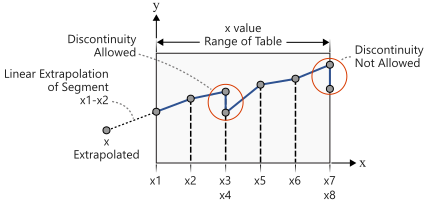
For FLAT=1, the same algorithm as FLAT=0 is used, except that values outside the range are not extrapolated. The corresponding start or end point y-values are used for all y-values outside the range.
- SMOOTH option is only available for Explicit Dynamic Analysis (ANALYSIS=NLEXPL).
- Linear extrapolation is not used for Fourier transform methods. The function is zero outside the range of the table.
- For frequency-dependent loads, x# is measured in cycles per unit time.
- Tabular values on an axis if X-Axis or Y-Axis=LOG must be positive. A fatal message will be issued if an axis has a tabular value ≤ 0.
- This card is represented as a load collector in HyperMesh.
- SCALE and OFFSET continuation lines are optional and cannot be put behind actual table data.
- The values of scale_x or scale_y cannot be set to zero.
- By scaling and offset, the new value is scale_x( + offset_x), and scale_y( + offset_y).