
STEP Import Options
Different methods and various import options in importing STEP files are explained below.
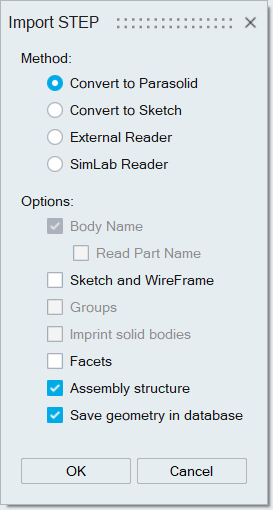
- Method
- Convert to Parasolid: STEP file is converted to Parasolid
file using a translator and then the converted Parasolid file is
imported into SimLab.
- Parasolid translator: Uses Parasolid libraries to convert the STEP file into a Parasolid file.
- External translator: Uses Spatial libraries to convert the STEP file into a Parasolid file.
- Convert to sketch: This option converts given sheet or wire body to sketch. Sketch conversion will take place only if all the bodies are completely sheet or completely wire and the bodies must lie in a same plane.
- External Reader: This uses Spatial libraries to import STEP files.
- SimLab Reader: This uses SimLab's STEP reader to import STEP files.Note:
- For Convert to sketch in Linux, motif library (system component) needs to be installed. If using CentOS, then motif library can be installed using the following command: sudo yum install motif. For other Linux distribution, use corresponding standard way to install motif shared library.
- Convert to Parasolid: STEP file is converted to Parasolid
file using a translator and then the converted Parasolid file is
imported into SimLab.
- Body Name
Body name of the STEP files can be read into SimLab by enabling the Body Name option.
- Read Part Name: Enabling this option reads the part name instead of body name.
- For External Reader Method: Earlier, the part names were read by setting the environmental variable SL_STEP_READ_PART_NAME=TRUE.
- For SimLab Reader Method: Earlier, the part names were read by setting the environmental variable SIMLAB_READ_CATIA_PART_NUMBER=TRUE.
- Facets
Selected STEP file can be imported directly as faceted geometry.
- Groups
Groups in the STEP file can be imported as SimLab groups using this option and it is only supported for SimLab Reader method.