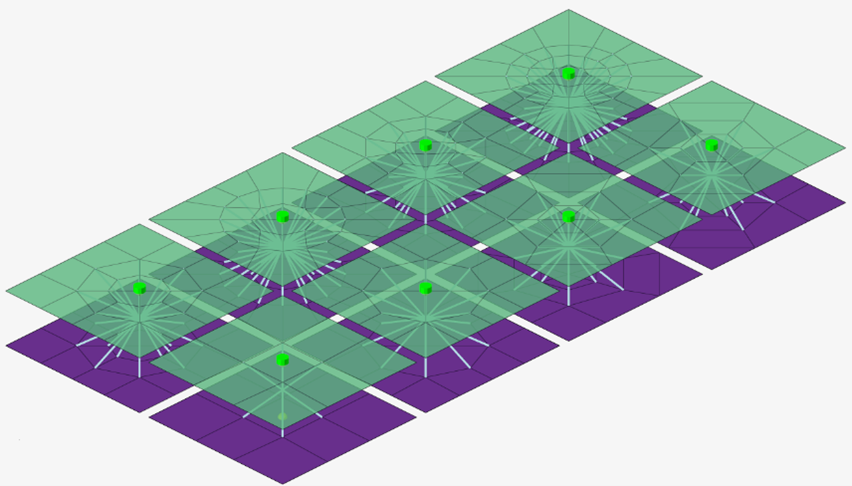
The Weld (Imprint) realization models a spotweld by pre/paring a circled shell mesh
from a specified number of elements and diameter.
The Weld (Imprint) realization creates a node that represents the spotweld’s position
between the links. Using the specified thickness and diameter, it creates a
constraint entity.
The constraint that is created uses the
*CONSTRAINTED_SPOTWELD_INTERPOLATION keyword.
Restriction: The Weld (Imprint) realization is only available in LS-DYNA.
Figure 1. Weld (Imprint) All Available Realizations
Realization Options
Option
Action
Quad Number
Select one of the mesh patterns to be created.
1, 4, 8, 12, or 32 quads
6 quads and 6 trias
16 quads and simple sym, 16 quads and double sym
Diameter Option
Select one of the methods to define the diameter value.
Diameter (constant value)
Diameter mapping file
Thickness Option
Select one of the methods to define the thickness of the
weld.
Shell gap
Shell thickness
Constant thickness
Notes
The Weld (Imprint) realization may have only one link for the case of
self-connection with two layers.
The maximum allowed number of links is two. The connector will fail
otherwise.
The Weld (Imprint) realization can be used to connect solid elements. The
Imprinting option is only available for shell mesh.
The constraints will be realized in Weld configuration.
It is recommended to use the shell thickness option to calculate the weld
thickness.
The Weld (Imprint) realization can be used with
hm_getvalue and the dependentnodeids dataname to
extract the IDs of the nodes that are dependent on the constraint.