
Manufacturing Check
Manufacturing check configurations.
Graphical User Interface Default Settings
- slide-number
- The initial slide number that is displayed on the report.
- action
- Action items.
- input
- Initial director for CAD input.
- output
- Initial director for results output.
Hole Details
- min-diameter
- The minimum diameter for the surface hole recognition. Holes below this diameter will be ignored.
- max-diameter
- The maximum diameter for the surface hole recognition. Holes above this diameter will be ignored.
- min-nodes
- The minimum number of nodes to recognize the finite element (FE) hole. Holes with nodes less than this number will be ignored.
- max-nodes
- The maximum number of nodes to recognize the finite element (FE) hole. Holes with nodes greater than this number will be ignored.
- adjacent-tolerance
- Distance to judge the duplicate holes for the same plate. If the Holes-to-Holes distance is less than this value, it is considered as a duplicate hole.
Connector Database
- Spot connection
- Spot CAD Entity: Points/solids/lines/cdh-data.
- Arc/Seam connection
- Arc CAD Entity: Surfaces/lines.
Checks
- Nut bolt seating surface check.
Detects the holes in the model which do not have connectors around them.
Figure 1. 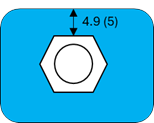
- Do check
- Check on/off.
- Feature angle
- Internal mesh face-to-face angle.
- Feature distance tolerance
- Distance between the nut's outer edge to the nearest surface's free edge.
- Tolerance for judgement
- Allowable tolerance for "OK" or "Not good".
- Stud seating surface check.
Detects the bolts and nuts which do not have corresponding holes to fit in.
Figure 2. 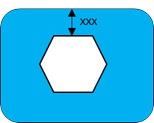
- Do check
- Check on/off.
- Feature angle
- Internal mesh face-to-face angle.
- Feature distance tolerance
- Distance between the nut's outer edge to the nearest surface's free edge.
- Tolerance for judgement
- Allowable tolerance for pass/fail.
- Electrode interference check.
Detects the bolts which have a hole around it, but the distance between the bolt center and hole center is more than the threshold value.
Figure 3. 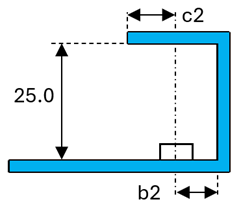
- Do check
- Check on/off.
- a2
- Distance between the bottom of the nut to the plate.
- b2
- Distance between the center of the nut to the plate.
- c2
- Distance between the center of the nut to the plate's edge.
- Free edge distance tolerance
- Value appended to a2, b2, and c2.
- Tolerance for judgement
- Allowable tolerance for pass/fail.
- Spot weld surface area check.
Detects the nuts which have a hole around it, but the distance between the nut center and the hole center is over the threshold.
Figure 4. 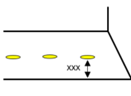
- Do check
- Check on/off.
- Thickness threshold
- CSV table thickness value.
- Radius if thickness is below threshold
- Radius of the imaginary circle.
- Radius if thickness is above threshold
- Radius of the imaginary circle.
- Free edge distance tolerance
- Distance between the imaginary hole and the free edge.
- Tolerance for judgement
- Allowable tolerance for pass/fail.
- Spot weld pitch check.
Based on the plate material, it checks the distance between weld locations. The required distance is calculated based on the CSV file table.
Figure 5. 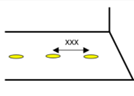
- Do check
- Check on/off.
- Pitch threshold CSV file
- File selection: Spot_pitch.csv.
-
Note: Special characters and blank spaces are not allowed in the file name.
Figure 6. 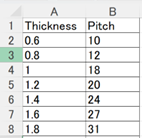
- Tolerance for judgement
- Allowable tolerance for pass/fail.
- Spot gun interference check.
Collision check between the spot gun and the weldable assembly model.
Figure 7. 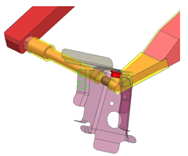
- Do check
- Check on/off.
- Spot gun file
- Spot gun CAD data: Catia, NX, JT, IGES, and so on.
-
Note: Special characters and blank spaces are not allowed in the file name.
Figure 8. 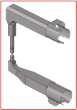
- Angle increment
- Incremental rotation angle at once (15, 30, or 45, for example).
- Arc weld torch interference check.
Collision check between the arc torch, the weldable nut, and the assembly model.
Figure 9. 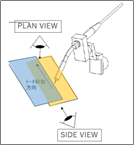
- Do check
- Check on/off.
- Torch file
- Spot gun CAD data: Catia, NX, JT, IGES, and so on.
-
Note: Special characters and blank spaces are not allowed in the file name.
Figure 10. 
- Min tilt angle
- Start angle (15, 30, or 45, for example).
- Max tilt angle
- End angle (15, 30, or 45, for example).
- Tilt angle increment
- Incremental rotation angle at once (5, 10, or 15, for example).
- Rotation increment
- Incremental rotation angle at once (15, 30, or 45, for example).
- Fillet radius check.
Checks the fillet radius against the material grade.
Figure 11. 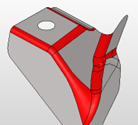
- Do check
- Check on/off.
- Minimum fillet radius
- Minimum fillet radius.
- Maximum fillet radius
- Maximum fillet radius.
- r threshold CSV file
- Select the file that has a fillet radius table.
-
Note: Special characters and blank spaces are not allowed in the file name.
Figure 12. 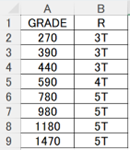
- Tolerance for judgement
- Allowable tolerance for pass/fail.
- Trim line radius check.
Checks edge fillet radius values against user-set value.
Figure 13. 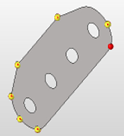
- Do check
- Check on/off.
- Pitch between points
- Default: 1.0.
- R threshold
- User-defined fillet value.
- Tolerance for judgement
- Allowable tolerance for pass/fail.
- Hole pitch check.
Checks the distance between the nearest holes against the threshold value from the CSV file.
Figure 14. 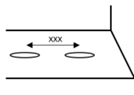
- Do check
- Check on/off.
- Pitch threshold CSV file
- Select file that has the fillet radius table.
-
Note: Special characters and blank spaces are not allowed in the file name.
Figure 15. 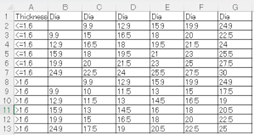
- Tolerance for judgement
- Allowable tolerance for pass/fail.
- Hole size check.
Checks the distance between the nearest holes against the threshold value set in the CSV table.
Figure 16. 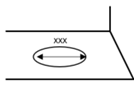
- Do check
- Check on/off.
- Diameter threshold CSV file
- Select the file that has the fillet radius table.
-
Note: Special characters and blank spaces are not allowed in the file name.
Figure 17. 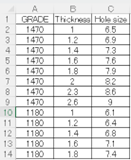
- Tolerance for judgement
- Allowable tolerance for pass/fail.
- Hole size of nut bolt check.
Checks the distance between the nearest holes. If it less than the threshold, then reports are generated.
Figure 18. 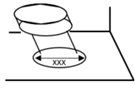
- Do check
- Check on/off.
- Nut diameter difference
- Allowable tolerance for the nut's diameter.
- Bolt diameter difference
- Allowable tolerance for the bolt's diameter.
- Tolerance for judgement
- Allowable tolerance for pass/fail.
- Corner radius of oblong designed hole check.
Checks the radius of the oblong holes at the corners against the threshold value in the configuration file.
Figure 19. 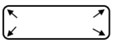
- Do check
- Check on/off.
- Pitch between points
- Default: 1.0.
- R threshold
- User-defined radius.
- Tolerance for judgement
- Allowable tolerance for pass/fail.
- Distance trim line hole end check.
Checks the distance between the hole edge against the nearest surface edge, and compares the result with the CSV table.
Figure 20. 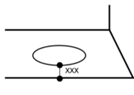
- Do check
- Check on/off.
- Distance threshold CSV file
- File selection: Distance_trimline_hole_end.csv.
-
Note: Special characters and blank spaces are not allowed in the file name.
Figure 21. 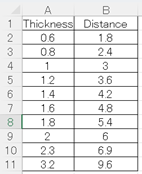
- Tolerance for judgement
- Allowable tolerance for pass/fail.
- Part interference check.
Checks the gap between the nearest parts at the physical location without surface offset. You can perform a surface offset to check at the mid location.
Figure 22. 
- Do check
- Check on/off.
- Clearance
- Allowable tolerance for pass/fail.