
Introduction of 3D Electrostatic
Presentation
The Electrostatic application allows the user to study the electric charges systems at equilibrium.
Use
Examples of Electrostatic applications are high voltage devices, spark-gaps, insulators, etc
Flux terminology - SimLab equivalent
A region is a group of geometric entities of same type having same physical properties.
Regions are classified as :
- Volume Region - Collection of volumes of same physical properties
- Face Region - Collection of surfaces of same physical properties
- Line Region - Collection of edges of same physical properties
- Point Region - Collection of points of same physical properties
Terminology of entities in Flux and SimLab
| Flux terminology | SimLab equivalent |
|---|---|
| Volume Region | Volume meshed bodies |
| Face Region | Faces |
| Line Region | Edges |
| Point Region | Vertex/Node |
Following are the commonly used physical properties on regions:
| 3D Electrostatic Regions | Physical property | Examples |
|---|---|---|
| Volume Region | Conductor/Insulator | Porcelain Insulators in Transformers |
| Face Region | Imposed voltage on surface | Electrodes |
| Line Region | Imposed voltage | Punctual Charge |
Attention: In this SimLab version it is
mandatory to define a global unit system before creating a 3D
Electrostatic Solution. Without a global unit system, the solving will not be
carried out (limitation in the Flux solver).
To define the global unit system:
- Activate

- Choose the wanted system
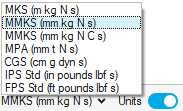
For more details on Unit System, please refer to the main page Unit System.