
Edit Solution

Introduction
After to Edit the solution, it's possible:
- to assign all the meshed bodies to the solution.The bodies to be assigned to the solution:
- should be meshed with surface mesh or volume mesh (limitation to
be left)Warning: Before running the solving process, you will have to generate the volume mesh.
- should belong to the same .gda model
- should be meshed with surface mesh or volume mesh (limitation to
be left)
- possibly to modify the frequency definition i.e. the frequencies for which the computation will be done.
Warning: It is not possible to modify here
the simulation type: the corresponding fields are grayed out. The simulation
type is only done during the creation of the AC Supplied Conductors
solution.
Note: This is a dedicated feature for SCAC
Workflow ribbon where the solution is created with or without
meshed bodies. To have more details about the creation of the AC Supplied
Conductors solution, please refer to AC Supplied Conductors solution.
Steps
- Double-click on the Solution button in the
Solution Browser
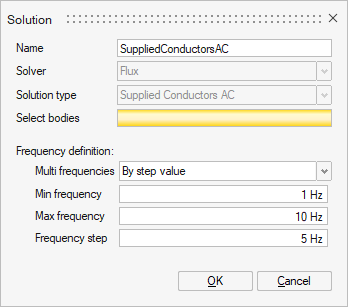
- Select all the meshed bodies:
The outlines of all the bodies are displayed in red. All the bodies are going to be assigned to the solution.
- Possibly modify the Frequency definition
- Click on the OK button