
MountBushing - Entity
The MountBushing entity is designed to easily simulate bushings used in ground vehicles. The MountBushing entity reads bushing stiffness (force-displacement) and damping (force-velocity) data from a file written in the TeimOrbit format.
- Forces-deflection properties are stored in one ASCII format file, called the property file.
- Multiple bushings may reference the same property file.
- The property file format is compatible with other MBD codes, such as SIMPACK and ADAMS.
- Bushing Coupling is supported as a user selected choice.
The AutoBush entity uses a Force_field XML statement in the MotionSolve deck, along with a subroutine to calculate the bushing forces and moments. The bushing property file is read by MotionSolve at the beginning of the simulation. MotionSolve uses Akima’s method to interpolate the force-deflection curves stored in the property file. For deflections outside the range in the property file, MotionSolve linearly extrapolates forces and/or moments.
Bushing Graphic
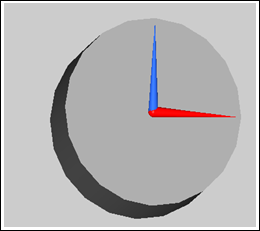
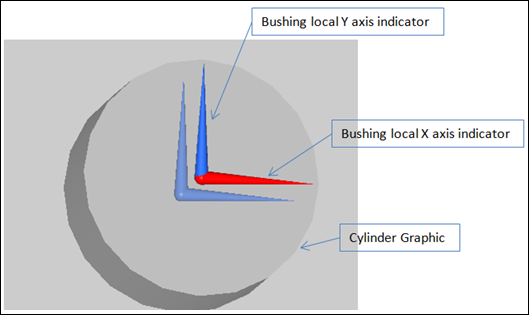
A bushing graphic appears when an MountBushing entity is added using the interface. The graphic includes a cylinder, and two large X-Y local coordinate frame indicators.
Coupling
- Method
- Description
- Rectangular
- The displacement on each axis of the bushing is computed independently.
- Cylindrical
- Couple the X and Y displacements (translational and rotational). The radial
deflection (r) is given by:
r = sqrt( x^2 + y^2 )
Fx = x/r*Gx( sign(x)*r )
Fy = y/r*Gy( sign(y)*r )
- Spherical
- Couple the X, Y, and Z direction displacements (translational and rotational). The
radial deflection (r) is given by:
r = sqrt( x^2 + y^2 + z^2 )
Fx = x/r*Gx( sign(x)*r )
Fy = y/z*Gy( sign(y)*r )
Fz = z/r*Gz( sign(z)*r )
Connect a MountBushing from the Entity Editor
Connections define the two connecting bodies, the point where the forces act, and the marker that defines the bushing orientation. Bodies, Markers, and Points can be selected either graphically or through the Model Browser.
-
From the Selectors tab, select the first body to connect.
The I marker of the Force_field statement in the solver deck lies on Body 1, is located at Point 1, and has the orientation of Marker.
- Click Body 1 and select a body from the modeling window.
- Double click Body 1 and select the required body from the dialog.
-
Similarly, select the second body to connect by clicking the
Body 2 input collector.
The J marker of the Force_field statement in the solver deck lies on Body, is located at Point 1, and has the orientation of Marker.
-
Select a point to locate the bushing.
The point defines the location where the bushing forces act. The I marker and the J (floating) marker of the Force_field statement are at Point 1.
- Click Point 1 and select a point from the modeling window.
- Double click Marker and select the required marker from the dialog.
-
Select a marker to orient the bushing in space.
- Click Marker and select a marker from the modeling window.
- Double click Marker and select the required marker from the dialog.
All three axes of the bushing are along the axes of the respective axes of the Marker (X-X,Y-Y,Z-Z).Click on the Property file browser icon to find the bushing property file. The file path is written to the solver deck and the file is read when the solver executes. The property file is written in the TeimOrbit format.
Tip: Click Edit File to edit and save the bushing property file.
TeimOrbit Bushing File
- HEADER
- The header block describes the format of the file, if it was written from a pre-processor.
- UNITS
- The units block describes the data in the file.
- DAMPING
- The damping in the bushing. Linear damping is supported in this bushing model and is shown in the file below.
- FX_CURVE, FYCURVE, and so on
- The Displacement vs Force data for the degree of freedom identified in the block header. Enter the data in ascending order.
$--------------------------------------------HEADER
[HEADER]
 FILE_TYPE     =  'bus'
 FILE_VERSION  =  4.0
 FILE_FORMAT   =  'ASCII'
$---------------------------------------------UNITS
[UNITS]
 LENGTH  =  'mm'
 ANGLE  =  'degrees'
 FORCE  =  'newton'
 MASS  =  'kg'
 TIME  =  'second'
$---------------------------------------------DAMPING
[DAMPING]
 FX_DAMPING  =  0.5
 FY_DAMPING  =  0.5
 FZ_DAMPING  =  0.5
 TX_DAMPING  =  0.5
 TY_DAMPING  =  0.5
 TZ_DAMPING  =  0.5
$----------------------------------------------FX_CURVE
[FX_CURVE]
{     x          fx}
-10.0   -45000.0
-8.0   -36000.0
-6.0   -27000.0
-4.0   -18000.0
-2.0   -9000.0
0.0   0.0
2.0   9000.0
4.0   18000.0
6.0   27000.0
8.0   36000.0
10.0   45000.0
$------------------------------------------------FY_CURVE
[FY_CURVE]
{     y          fy}
-10.0   -45000.0
-8.0   -36000.0
-6.0   -27000.0
-4.0   -18000.0
-2.0   -9000.0
0.0   0.0
2.0   9000.0
4.0   18000.0
6.0   27000.0
8.0   36000.0
10.0   45000.0
$-------------------------------------------------FZ_CURVE
[FZ_CURVE]
{     z          fz}
-10.0   -4500.0
-8.0   -3600.0
-6.0   -2700.0
-4.0   -1800.0
-2.0   -900.0
0.0   0.0
2.0   900.0
4.0   1800.0
6.0   2700.0
8.0   3600.0
10.0   4500.0
$-------------------------------------------------TX_CURVE
[TX_CURVE]
{    ax          tx}
-45.0   -2025000.0
-36.0   -1620000.0
-27.0   -1215000.0
-18.0   -810000.0
-9.0   -405000.0
0.0   0.0
9.0   405000.0
18.0   810000.0
27.0   1215000.0
36.0   1620000.0
45.0   2025000.0
$--------------------------------------------------TY_CURVE
[TY_CURVE]
{    ay          ty}
-45.0   -2025000.0
-36.0   -1620000.0
-27.0   -1215000.0
-18.0   -810000.0
-9.0   -405000.0
0.0   0.0
9.0   405000.0
18.0   810000.0
27.0   1215000.0
36.0   1620000.0
45.0   2025000.0
$---------------------------------------------------TZ_CURVE
[TZ_CURVE]
{    az          tz}
-45.0   -36000.0
-36.0   -28800.0
-27.0   -21600.0
-18.0   -14400.0
-9.0   -7200.0
0.0   0.0
9.0   7200.0
18.0   14400.0
27.0   21600.0
36.0   28800.0
45.0   36000.0
Subroutine Definition
Input Parameters
The Mount Bushing subroutine is defined in the msautoutils.dll (.so) with fiesub function name.
Force subroutine input user string:
usrsub_param_str="USER(P1,P2,P3,P4,P5,P6,P7,P8,P9)"| Parameter | Description |
|---|---|
P1
|
Branch Flag = 810; ensures the bushing field function |
P2 |
Bushing property file name solver string ID (bus) |
P3 |
Coupling {0 or 1 = Rectangular, 2 = Cylindrical, 3 = Spherical} |
P4 |
Array ID holding X direction scales and offsets |
P5 |
Array ID holding Y direction scales and offsets |
P6 |
Array ID holding Z direction scales and offsets |
P7 |
Array ID holding RX direction scales and offsets |
P8 |
Array ID holding RY direction scales and offsets |
P9 |
Array ID holding RZ direction scales and offsets |
| Scale and offset arrays for each translation and rotational direction (P4→X,P5→Y ..etc) | |
|---|---|
| Index | Description |
| 0 | Displacement offset |
| 1 | Displacement scale |
| 2 | Velocity offset |
| 3 | Velocity scale |
| 4 | Force offset |
| 5 | Scale stiffness force |
| 6 | Scale damping force |
Force Definition Block in the xml
<!-- MODEL.mountbushing_0.frcBus -->
  <Force_Field
     id                  = "303001"
     label               = "MountBushing 0-Bushing Force"
     full_label          = "Model-MountBushing 0-MountBushing 0-Bushing Force"
     i_marker_id         = "30302031"
     j_marker_id         = "30301033"
     usrsub_param_string = "USER(810,303001,0,30300100,30300200,30300300,30300400,30300500,30300600)"
     usrsub_dll_name     = "msautoutils"
     usrsub_fnc_name     = "fiesub"
  />
Outputs
| Type | Component | Quantity |
|---|---|---|
| User Defined (.plt) REQSUB (.abf) |
Mount Bushing – Disp. Bushing Mount Bushing – Velocity Bushing Mount Bushing – Force Bushing Mount Bushing – Acc Bushing |
DX / VX / FX / ACCX |
| DY / VY / FY / ACCY | ||
| DZ / VZ / FZ / ACCZ | ||
| AX / WX / MX / RACCX | ||
| AY / WY / MY / RACCY | ||
| AZ / WZ / MZ / RACCZ |
Output Subroutine Definition
The Mount Bushing output subroutine is defined in the msautoutils.dll with fieldReq function name.
Output subroutine input user string:
usrsub_param_str="USER(P1,P2,P3,P4,P5)"| Parameter | Description |
|---|---|
| P1 | Branch Flag = 905; ensures the bushing field requests |
| P2 | Output type (1: Displacements 2: Velocities 3/4: Forces 5: Accelerations) |
| P3 | Marker ID of body I |
| P4 | Marker ID of body J |
| P5 | Field force element ID |
Output Definition Block in the xml
<!-- MODEL.mountbushing_0.o_userDispBushing -->
  <Post_Request
     id                  = "70000000"
     label               = "MountBushing 0-Displacement Bushing"
     comment             = "MountBushing 0-Displacement Bushing"
     type                = "USERSUB"
     usrsub_param_string = "USER(905,1,30302031,30301033,303001)"
     usrsub_dll_name     = "msautoutils"
     usrsub_fnc_name     = "fieldReq"
     cname2              = "X"
     cname3              = "Y"
     cname4              = "Z"
     cname6              = "RX"
     cname7              = "RY"
     cname8              = "RZ"
  />