
Tumble Test

Overview
The tumble test simulates the repeated impact and drop scenarios that electronic devices (e.g., smartphones, tablets, and other portable electronics) are likely to encounter during typical use. It involves placing the device inside a rotating barrel (which is spun at a defined RPM) that drops the device randomly in multiple orientations. This process mimics accidental falls, subjecting the device to mechanical stresses and impacts. The goal is to assess the device’s structural integrity, identify potential failure modes, and evaluate the resilience of its assemblies under cyclic impact loading.
Solution Parameters
Rotating Barrel Definition:
- User-Defined Barrel Setup:For users with an existing, pre-assembled barrel design, the following parameters must be defined:
- Barrel Geometry: Define the geometry of the barrel body.
- Rotation Axis: Specify the axis around which the barrel rotates.
- Rotational Speed (RPM): Set the barrel’s rotational speed
to control the drop frequency and impact conditions.
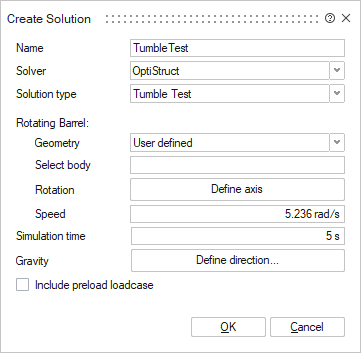
- Standard Barrel Setup:Users can select from predefined barrel geometries, available in SimLab, that comply with industry standards. When a standard barrel is selected, the system will automatically configure the barrel orientation relative to the specimen or device. The user must define:
- Test Standard: Select the relevant test standard.
- Specimen Resting Face: Define the resting face of the
specimen (the part of the device that will be in contact with
the barrel during rotation).
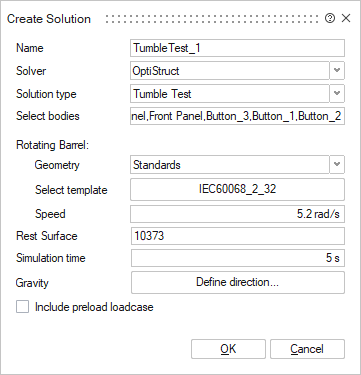
Simulation Duration:
The total time for which the barrel rotates can be specified here. The duration directly influences the number of impacts the device experiences.
Gravity Direction:
This parameter defines the gravitational direction in the simulation, allowing for correct alignment of forces acting on the test specimen.
Preloading Effect:
For simulations requiring the resolution of contact penetrations or the simulation of initial deformations, the “Include Preloading Loadcase” toggle should be enabled. This enables a preload subcase, which ensures proper handling of contact interactions and mechanical deformations before the tumble test begins.
- Currently, SimLab supports only the IEC 60068-2-3 standard for tumble testing. Users should ensure that their setup complies with this standard when selecting predefined barrel configurations.
- The tumble test solution is supported for OptiStruct solver.
- The preload loadcase will be solved using the implicit solver, whereas the barrel rotation subcase will be solved using the explicit solver to account for the high-impact, dynamic nature of the test.
- When the solution is created, general contact between the barrel and the test specimen is automatically generated. However, users must manually define any additional contact interactions within the specimen itself (e.g., internal components or interfaces).