
Electromagnetic

Introduction
The electromagnetic solution is used to analyze low frequency electromagnetic problems that are widely being used across multiple industry verticals today. The electromagnetic solver accurately captures the complexity of electromechanical equipment to optimize their performance, efficiency, dimensions, cost or weight with precision, bringing better innovation and value products to end users. The electromagnetic solver currently supports magnetostatic and transient conditions.
A wide variety of physics is currently supported to analyze various electromagnetic applications that are currently being investigated by the industry. These include electrostatics, magnetostatics and transient magnetics. Most of these physics are supported for various problem dimensions such as 2D, 3D and axisymmetric cases. Various features like a fully parametric 2D sketcher, circuit designer / circuit catalog, dedicated meshing tools, motion support etc. have been developed to help the user quickly and efficiently setup their EM workflows. A powerful electromagnetic solver coupled with efficient automation, an intuitive interface and multiple multiphysics capabilities will enable our users to design better and more efficient products.
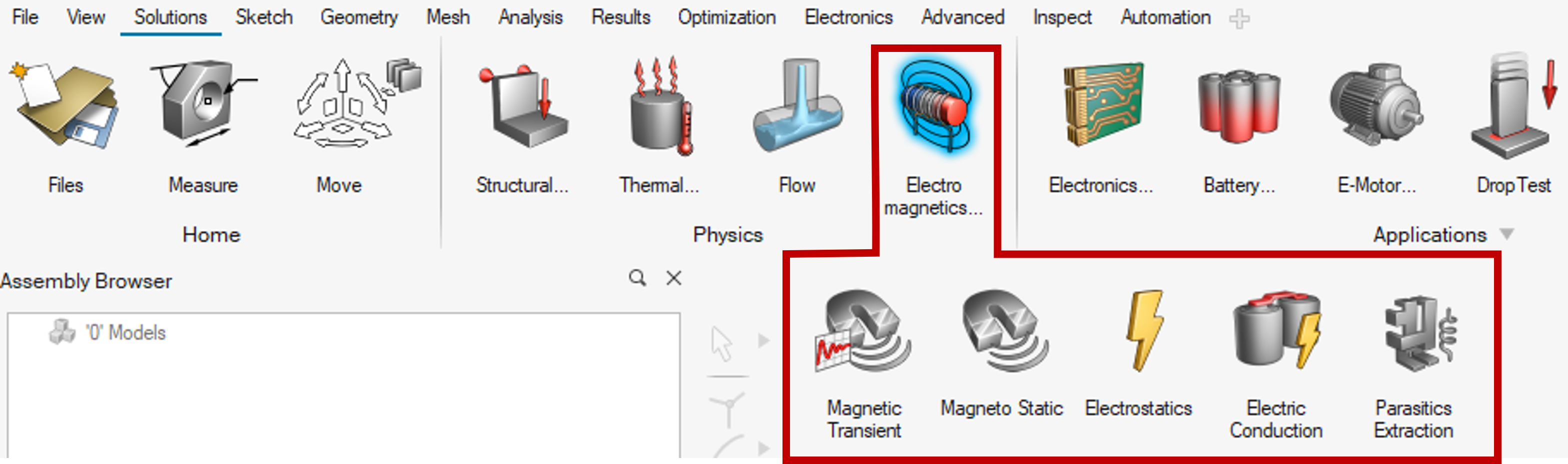
User must select the appropriate physics in the solution panel. Accordingly, boundary conditions, solution parameters, material creation and assignment will be automatically setup to run an electromagnetic solution, launch the solver and visualize the results.
Solution type
- Flux
- Magnetostatic
- Magnetostatic Integral
- Transient Magnetic
- AC Magnetic
- Electrostatic
- Parasitics Extraction
- AC Supplied Conductors
- Magneto-Mechanical Topology Optimization
Note: Export to Flux (not available for Parasitics Extraction and AC Supplied Conductors)During analysis user has the flexibility to export the project at any time to legacy Flux for further physics definition or postprocessing.
- Export and open in Flux - Can transfer the information from solution to Flux and Open Flux UI
- View in Flux - results can also be opened in Flux UI
- OptiStruct
- Electrical Analysis
- Steady State Electric Conduction
- Multi State Electric Conduction
- Electrical Analysis
Solution conversion
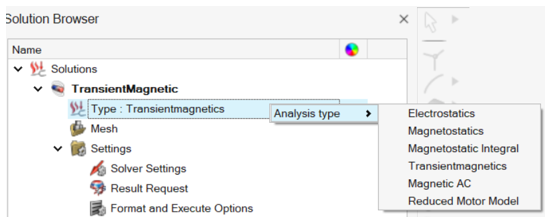
It is possible to convert a solution to another solution within the same Domain (2D/Axisymmetric/3D). The associated physics (Loads and Constraints, Circuit, Material) relevant to the new solution are kept or converted after the solution conversion.
The new solution must be checked and completed before solving.
The solution conversion is available by right-click on the solution Type:
Available Tutorials
Use SimLab - Learning center videos for more tutorials on Model setup using Solution approach.All available electromagnetic Examples are details in the following link: Flux in SimLab Tutorials.