
Result request

Introduction
The Result Request function has been added for Electromagnetic solutions:
- 2D Magnetostatic (MS2D)
- 3D Magnetostatic (MS3D)
- 3D Magnetostatic Integral (MSIM)
- 2D Transient Magnetic (MT2D)
- 3D Transient Magnetic (MT3D)
- 2D AC Magnetic (MAC2D)
- 3D AC Magnetic (MAC3D)
- Parasitics Extraction (PE)
- AC Supplied Conductors (SCAC)
The Result Request allows the user to select the list of global quantities that he wants to postprocess in function of another parameter (position, time…).
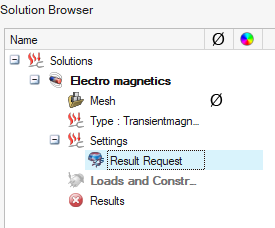
Dialog Box
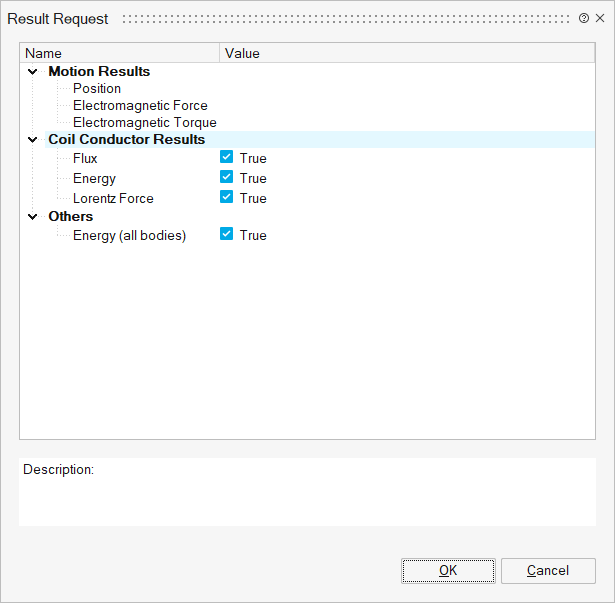
List of Result Request for EM Solutions
By default, the predefined quantities of the motion are displayed (and cannot be modified), and the user has the choice to add or remove the other quantities. The list of these proposed quantities is in this dedicated GUI and depends on the studied solution (MS2D, MS3D, MT2D...).
Export H3D Result files: this option has been added to support the exports or not of the graphical result contours for Magnetostatic Integral and AC Supplied Conductors. This option can help to save time in cases of Design of Experiments, when it is only interesting to see global values. This option is enabled by default.
| Category | Global quantities | SimLab Solution | |||||||
|---|---|---|---|---|---|---|---|---|---|
| MS2D | MS3D | MSIM | MT2D | MT3D | MAC2D | MAC3D | SCAC | ||
| Motion | Position |  |
|
|
|
|
|
|
 |
| Speed | |
|
|
|
|
|
|
|
|
| Acceleration | |
|
|
|
|
|
|
|
|
| Electromagnetic Force | |
|
|
|
|
|
|
|
|
| Electromagnetic Torque | |
|
|
|
|
|
|
|
|
| Mechanical power | |
|
|
|
|
|
|
|
|
| Coil Conductor | Voltage | |
|
|
|
|
|
|
|
| Current | |
|
|
|
|
|
|
|
|
| Active power | |
|
|
|
|
|
|
|
|
| Reactive power | |
|
|
|
|
|
|
|
|
| Flux | |
|
|
|
|
|
|
|
|
| Joule loss | |
|
|
|
|
|
|
|
|
| Energy | |
|
|
|
|
|
|
|
|
| Lorentz force | |
|
|
|
|
|
|
|
|
| Inductance | |
|
|
|
|
|
|
|
|
| Solid Conductor | Voltage | |
|
|
|
|
|
|
** |
| Current | |
|
|
|
|
|
|
** |
|
| Active power | |
|
|
|
|
|
|
|
|
| Reactive power | |
|
|
|
|
|
|
|
|
| Joule loss | |
|
|
|
|
|
|
** |
|
| Current and Voltage sources | Voltage | |
|
|
|
|
|
|
** |
| Current | |
|
|
|
|
|
|
** |
|
| Active power | |
|
|
|
|
|
|
|
|
| Reactive power | |
|
|
|
|
|
|
|
|
| Resistance Inductor Capacitor |
Voltage | |
|
|
|
|
|
|
** |
| Current | |
|
|
|
|
|
|
** |
|
| Active power | |
|
|
|
|
|
|
|
|
| Reactive power | |
|
|
|
|
|
|
|
|
| Switch | Voltage | |
|
|
|
|
|
|
|
| Current | |
|
|
|
|
|
|
|
|
| Active power | |
|
|
|
|
|
|
|
|
| Diode | Voltage | |
|
|
|
|
|
|
|
| Current | |
|
|
|
|
|
|
|
|
| Active power | |
|
|
|
|
|
|
|
|
| Brush-Segment | Voltage | |
|
|
|
|
|
|
|
| Current | |
|
|
|
|
|
|
|
|
| Active power | |
|
|
|
|
|
|
|
|
| Squirrel Cage | Voltage | |
|
|
|
|
|
|
|
| Current | |
|
|
|
|
|
|
|
|
| Active power | |
|
|
|
|
|
|
|
|
| Reactive power | |
|
|
|
|
|
|
|
|
| Joule loss | |
|
|
|
|
|
|
|
|
| Advanced Results | Joule Losses (* Averaged Joule Losses) |
|
|
|
* |
* |
|
|
|
| Iron Losses (* Averaged Iron Losses) |
|
|
|
* |
* |
|
|
|
|
|
|
|
|
|
|
|
|
|
|
| Position step | |
|
|
|
|
|
|
|
|
| Number of layers in extrude direction | |
|
|
|
|
|
|
|
|
| Calculate for full geometry | |
|
|
|
|
|
|
|
|
| Sheet Lamination | Iron Losses | |
|
|
|
|
|
|
|
|
|
|
|
|
|
|
|
|
|
| Thin Region | Joule loss | |
|
|
|
|
|
|
** |
| Others | Energy (all bodies) | |
|
|
|
|
|
|
|
| RMS or Max for Voltage, Current and Flux | |
|
|
|
|
|
|
|
|
- Current and Voltage for available components ( Current and Voltage Sources, Resistor, Inductor, Capacitor, Solid Conductor)
- Joule losses for Solid Conductor component and Thin Region