
Safety Tools
New Features
- Generic Impact Workflow
- This tool is available in Radioss, LS-DYNA and PAM-CRASH profiles, allowing:
- The definition of impact points on any type of structural parts.
The creation of impact points can be done by three different methods:
- Manual selection of locations on the graphic.
- Import of impact locations defined in a .csv file.
- Automatic creation of a raster or grid of points on a
user-defined plane and projection on the surface to
impact. For example:
Figure 1. 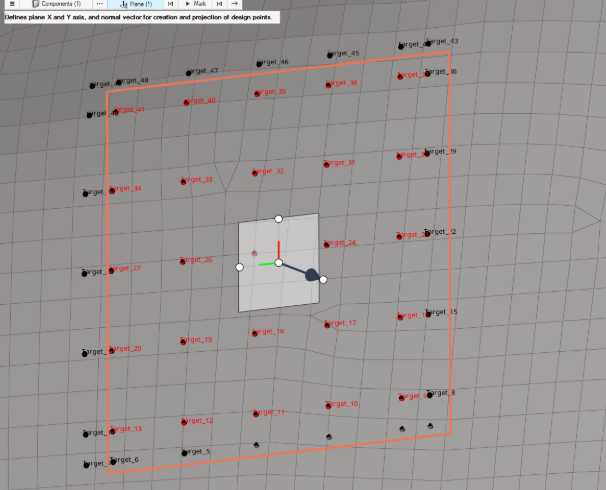
- The automatic positioning of any type of impactors following one of the positioning logic Normal to Target or Target/Angles.
- The automatic export of ready-to-run solver decks. The logic of
export of the solver decks follows the same logic used in other
Safety Tools such as the IP Impact tool.The example below shows multiple impact simulations on a door-trim using a spherical impactor:
Figure 2. 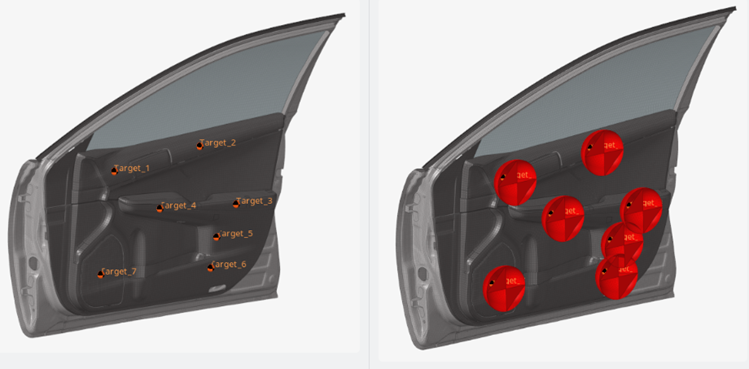
- The definition of impact points on any type of structural parts.
The creation of impact points can be done by three different methods:
Enhancements
- Seatbelt Tool
- Radioss profile: Creation of /SLIPRING/SHELL is now available from the Seatbelt tool via the Slipring 2D context menu option on control point.
- Radioss, LS-DYNA and PAM-CRASH profiles: Creation of full-meshed
slipring is enhanced, using an embedded simulation for robust and high
quality results.
Figure 3. 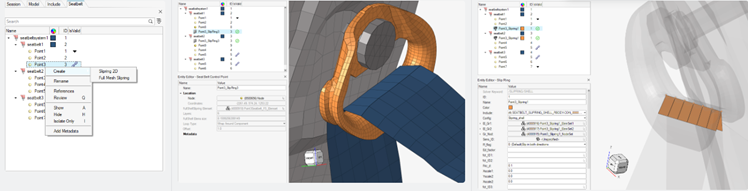
Resolved Issues
- IP Impact Tool: CSV files are now correctly exposed for selection for the creation of points with Testlab method.