
Post
New Features
- Abaqus Ply Matching for Composite Post-processing
- Ply matching allows for effective post-processing of composite results,
as particular plies can be selected consistently instead of looking at
section point results, which might involve different plies for the same
section point. The naming convention includes:
- Plyname_TOP/MID#/BOT for composites
- SHELLLAYERS_TOP/MID#/BOT for metallic shells
- Plot Controller Workflow
- The Plot Controller workflow now includes the options to switch between
“By SectionPoint” (traditional option) and “By Layer”.
Figure 1. 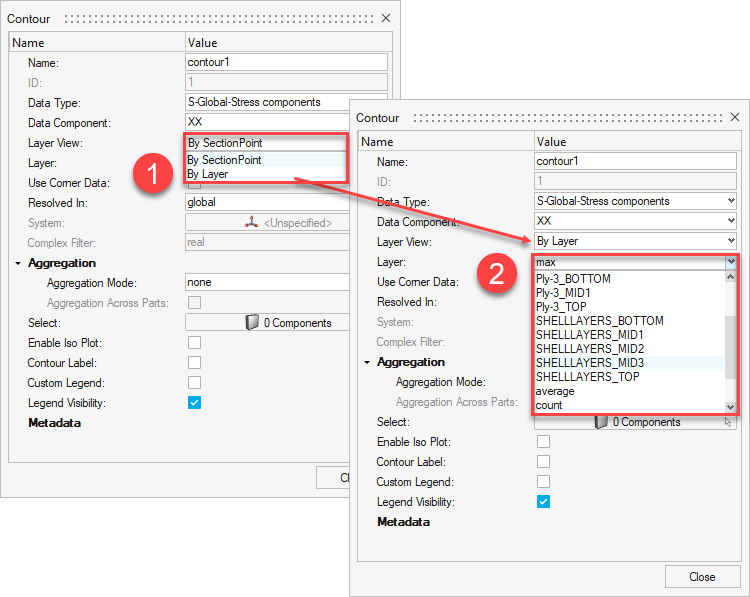
- Result Query and Matrix Browser Support
- The Result Query and Matrix Browser are now supported via a new option in the Preference dialog. From the File menu, select .
Enhancements
- Random Response Dialog
- Support for the following interfaces and result files have been
added:
- Nastran: OP2, XDB
- Abaqus: ODB
- ANSYS: RST
- An option has been added to use charts (only from direct input) and curves created in a HyperMesh session as PSD curve inputs. To access this option, go to the
- Default file location for the input files of the model file if the model file is imported in the session.
- A filter has been added to sort by name or ID in the Subcase and Results dialog.
- 4K resolution dialog enhancements have been added.