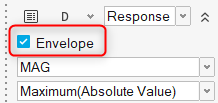
A new envelope response is now available for displacement responses.
When selected in the microdialog during the response creation, the
envelope response will report the maximum displacement value for each
selected node across the entire exploration.Figure 1. A new Envelope Response tab in Results Explorer will report the
response values, and a corresponding envelope contour can be
displayed.
Compliance Response
A new compliance response is now available for explorations using
OptiStruct as a solver and can be created via the Mass/Volume Response
tool.
ExpertAI
ExpertAI, previously only available within Results Explorer, is now also
available as a standalone tool and can be used to reference both Design
Explorer and external explorations. Now it’s possible to open and use
DOEs and optimizations which may have originated outside of Design
Explorer.
Enhancements
Generative Design
The Generative Design workflow can now support multiple design spaces
simultaneously. Previously, you were forced to select a single design
space for concept generation.
The draw direction and symmetry design variables have been updated to
allow quick creation of primary planes in both positive and negative
directions. Previously, only positive directions were supported. Others
needed to be manually created.
Replicate Design Variables
Multiple replicate design variables can now be created at the same time
by selecting multiple lines. Previously, only a single line could be
selected, so replicate design variables had to be created one at a
time.
Replicate design variables can be created by selecting nodes. In this
special case, instance numbers will be automatically selected as 0 and 1
and cannot be changed.
For doublers and bulkheads, attributes of instances can now also be made
variable. Previously, only the number of instances was variable and all
properties were fixed.
Connector Design Variables
The Weld Length and Break Length attributes, which are available when a
connector’s Skip Welding attribute is selected, can now be considered
when creating connector design variables.
Miscellaneous Enhancements
Nominal runs are now optional. You how have the ability to select
whether or not to include a nominal run in your exploration.
You are now prompted when opening a model containing explorations if the
study path does not match the folder containing the opened model, and
the path is automatically reconciled if desired.
Exploration evaluation now occurs in a separate thread, so you can close
your HyperMesh session during evaluation if desired.
More interactive feedback is provided for failed exploration runs. By
moving the mouse over a failed exploration run, error information will
be displayed.
Other miscellaneous performance improvements have been done.