
Connectors
New Features
- Attachments
- Attachments with RBE3 or RBE3 (stuck node) support weight factor calculation methods (inverse distance, normal distribution, constant value) with the normalization option applied are now available. In the Abaqus solver interface, these new options are available and applied on the constraint entities that are being created.
- Point Connectors
- The new Weld (Imprint) realization has been added. It is a new type of
point connector, and it is supported in the LS-DYNA solver interface.
This new realization creates constraints and has imprint
capabilities.
Figure 1. 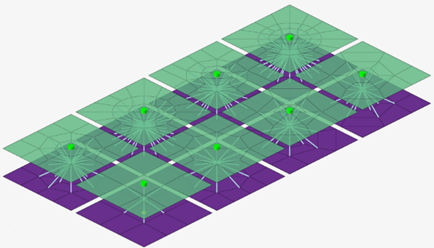
- Fastener Connectors
- Solid type fasteners now support the following:
- The new Pattern 6, which creates a bolt with double-sided head
and washers. A preview schematic with all the dimensions is also
available.
Figure 2. 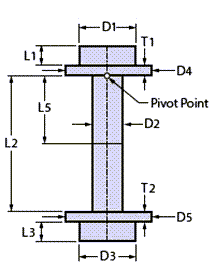
- The Nastran solver interface. Contacts and pretension definitions are added to match Nastran’s requirements.
- Automatic calculation of a bolt’s shaft length and diameter.
- New options for refined mesh areas for evaluation near the bolt’s head and shaft length offset based on shell thickness.
- The new Pattern 6, which creates a bolt with double-sided head
and washers. A preview schematic with all the dimensions is also
available.
- Clip type fasteners now support new patterns. You can use these options
to choose the type of clip you would like to realize the connector on,
based on its configuration. Previews of the each pattern are also
available.
Figure 3. 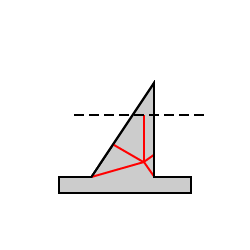
Figure 4. 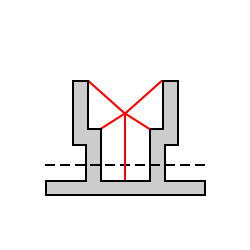
Figure 5. 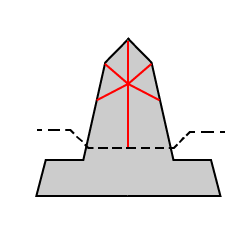
- Line Connectors
- Line connector types that realize contacts now support the creation of heat affected zones (HAZ). In particular, Contact, Hexa (Contact), and Beam (Contact) now offer a new HΑΖ option in the controls. For Hexa (Contact) and Beam (Contact), the HAZ option is only available when local contact is selected.
- Area Connectors
- The new "Auto-trim" option in area controls has been added. When it is enabled, all the areas that fail to find a projection are trimmed from the connector when realizing.
- Miscellaneous
- A locking capability has been introduced for connectors. With the
locking capability, connectors can be realized and locked to prevent
them from unrealizing. Already realized connectors can be locked and
unlocked on demand. A locked connector is indicated in the Connector
Browser with the
 icon.
icon.
Enhancements
- Attachments
- The Auto Attachments and Auto Connect tools have been introduced as
satellite options on the Connectors ribbon. These tools can be used to
create attachments based on hole recognition and connect them
automatically.
Figure 6. 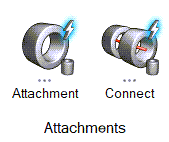
- Point Connectors
- Spring (rigid) type fasteners have been enhanced so that the realized RBE3 elements attach to all nodes of second order elements instead of only corner nodes.
- Fastener Connectors
- The Colinearity option has been relocated from the Preferences options to the Hole type control. This way it can work locally on the connector level instead of globally.
- Line Connectors
- Seam Quad:
- Previously, connectors with the "Use Extension" option enabled would create a poorly structured mesh. The process has been improved and the resulting mesh is well structured.
- Snapping options have been added to the control. As a result, fine tuning the realization near free edges has been improved.
- Automatic weld recognition has been enhanced to identify cases with mixed T and L welds.
- The control has additional LTH and LTV options for weld size dependent realizations. In particular, the "t1/2+wh" and "wh" options have been introduced for LTH and the "wv" option has been introduced for LTV.
- Realizations have been improved to be able to realize tabs and
slots use cases. This additional logic also supports imprinting
and HAZ creation.
Figure 7. 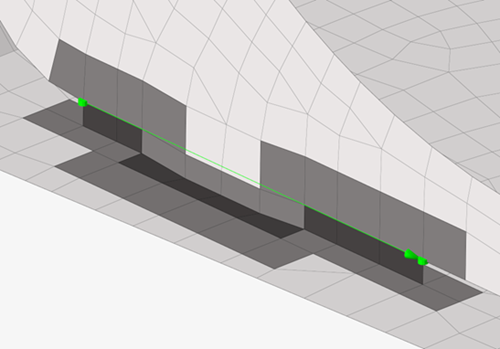
Figure 8. 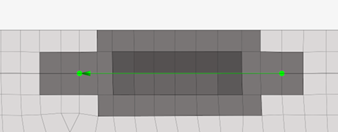
- Miscellaneous
- The connector state icons have been redesigned to enable more intuitive
workflows and improved accessibility.
Figure 9. Realized 
Figure 10. Unrealized 
Figure 11. Failed 
Figure 12. Modified 
Resolved Issues
- The Seam Quad control has been fixed so it does not show any HAZ related options when the Connectivity option is set to imprint/no HAZ.
- Seam Quad line connectors that were shaped as closed loops are now fixed and the realization issues have been addressed for this use case so that the realization is successful.
- Shape type attachments have been fixed so their interface node ID respects the Include’s ID range when they are realized, if applicable.
- The "Ensure Projection" option for point, line, and area connectors has been fixed to equivalence coincident nodes.
- The "Update" option now applies only to realized connectors or realized connectors with post errors.
- Hexa (Contact) area connectors in the Radioss solver interface have been fixed to use PENTA6DG elements. Property-element incompatibilities have been fixed.
- An outdated connector XML text block is no longer written in the solver deck file during export.
- Issues with exporting connector files using xMCF format have been fixed. Export now should work as expected for all solver interfaces.
- During solver deck export, redundant warning messages are consolidated into one for cases when files contain connectors with incorrect pitch-to-length values.
- Unsuccessful realizations of fasteners that link attachments resulted from applying scenarios are now resolved. Now, when using the apply all option from the Scenario Manager, attachments will be first in the queue followed by connectors.