Solver Interface Specific Behavior

Solver-specific behavior includes deviations from or additions to the standard post-processing features.

Abaqus Solver Profile

The main addition to the standard post-processing behavior for the Abaqus solver profile is the section point to ply/layer mapping of results. Due to the limitations given in the Dassault APIs, our Abaqus results (ODB files) reader cannot access the relevant information related to:
  • Ply names
  • The number of integration points per ply/layer

Furthermore, the integration points' results that are output are defined in the solver deck, so the result file may only include results at selected section points, as opposed to all.
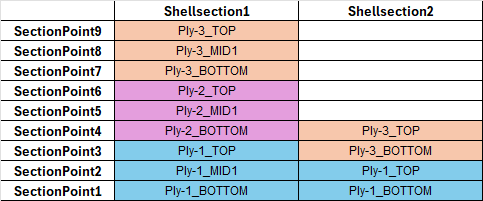
In the following simple example, there are two *SHELL SECTION properties, each with a different number of integration points (IP) per ply and a different number of plies. Ply1 and Ply3 exist in both.
Figure 1.


If SectionPoint3 is selected, results for "Ply-1_IP3" and "Ply-3_IP2" are shown at the same time. To see the results for the outermost integration point of Ply-3, you must limit the selection to SectionPoint9 and Shellsection1, followed by SectionPoint4 with Shellsection2. It is not possible to review them simultaneously. Hence, a mapping from the existing section points in the result file to the actual layers in the model and their respective section points was introduced for efficient post-processing.

Depending on the number of integration points per layer, those get mapped to “Plyname_BOTTOM”, “Plyname_MID#” and “Plyname_TOP” for the “*SHELL SECTION, COMPOSITE”, “*SHELL GENERAL SECTION, COMPOSITE”, and “*SOLID SECTION, COMPOSITE” properties.
#IP Suffixes
1 _MID1
2 _BOTTOM, _TOP
3 _BOTTOM, _MID1, _TOP
n; n>3 _BOTTOM, _MID1, …, MID(n-2), _TOP
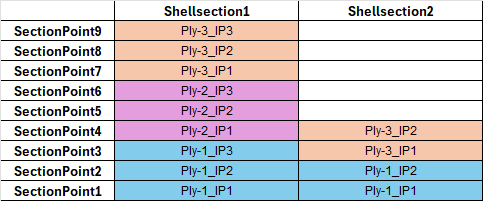
The mapping for the previous example is shown below.
Figure 2.


Metallic sections are also mapped to “SHELLLAYERS”, with the corresponding “_BOTTOM”, “_MID#”, or “_TOP” suffix, depending on the number of property integration points.

Plot Controller Workflows
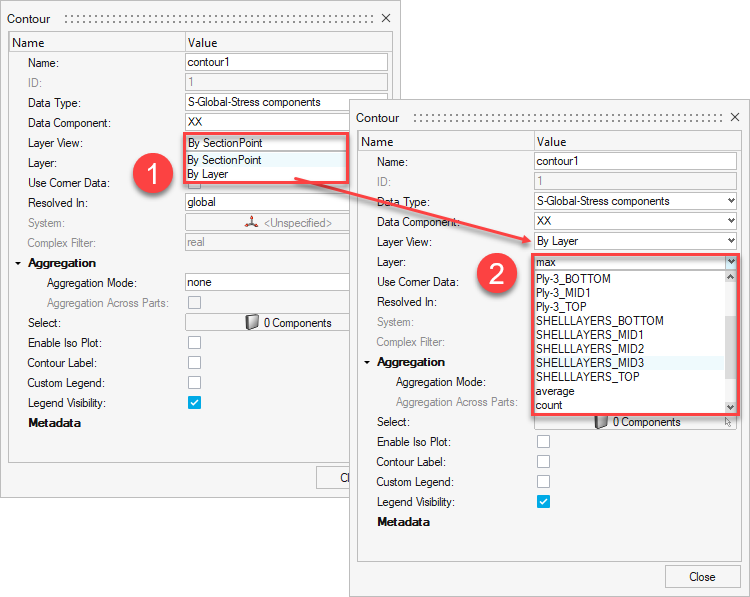
In addition to the Layer selection, a Layer View type selection is available for contour plots, tensor plots, and marker plots. Layer View contains the options "By SectionPoint" and "By Layer". "By SectionPoint" makes all available section points selectable from the Layer drop-down menu. If By Layer is selected, the Layer drop-down menu contains all potential options. In both cases, layer filters such as max, min, average, count, and so on, are available.
Figure 3.


Matrix Browser and Results Query

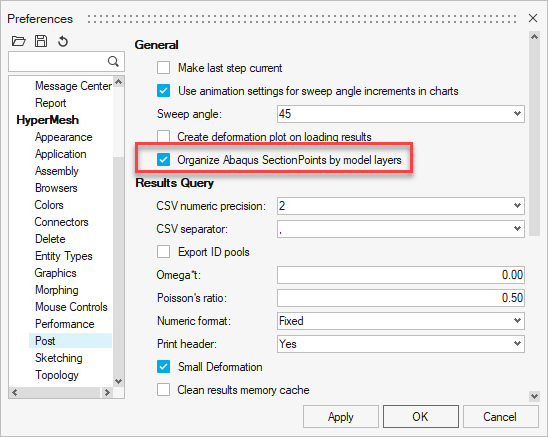
Both Matrix Browser and Results Query support the different types of layer selections as well. However, this is not directly available in the respective selection tools. To switch the contents of the Layer section from one to another, go to File > Preferences > HyperMesh > Post. From the General section, select or deselect Organize Abaqus SectionPoints by model layers. The Layer selections in both tools will then offer section points or layers, respectively.
Figure 4.