Besides creation of a graphic, Road Tools also provide you with the ability to
extract the centerline from road property files using the “Create Driver path”
option. This option extracts the centerline in a .ddf file (see
Driver Demand File (DDF) for additional information), which
is a TeimOrbit format, or as comma separated value .csv format.
Similar to the “create graphic” utility, the extraction of centerline is supported
for all types of roads covered under Altair Roads.
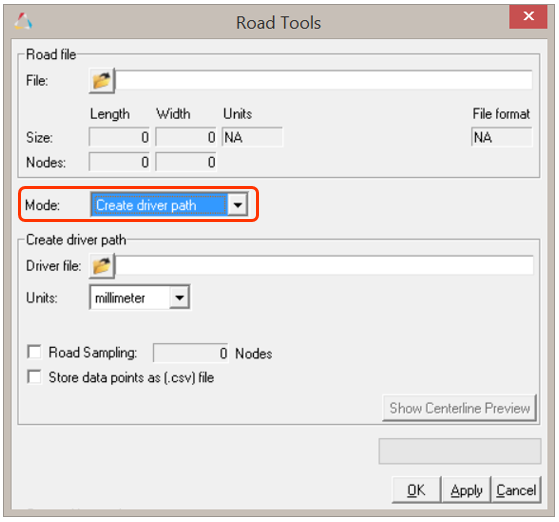
The Create Driver Path option can be used by selecting the option from the "Mode"
drop-down menu.Figure 1. Extracting Road Centerline
The steps to extract the centerline path are outlined below.
File Selection:
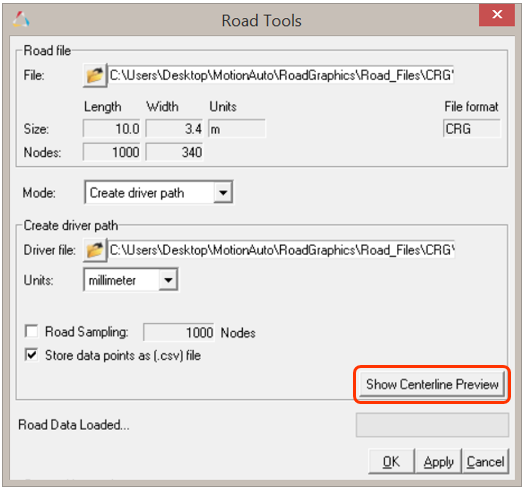
Similar to the Create graphic option, upon selecting an
input road property file, the file is read by an internal parser and the input
fields are populated. The driver data file is saved at the provided location.
Additionally, the centerline data can also be saved in comma separated value
format by selecting the Store data points as (.csv) File
option check box. Figure 2. Extracting road centerline along with .csv
Centerline Preview tool:
Also, before saving and extracting centerline from the road description file,
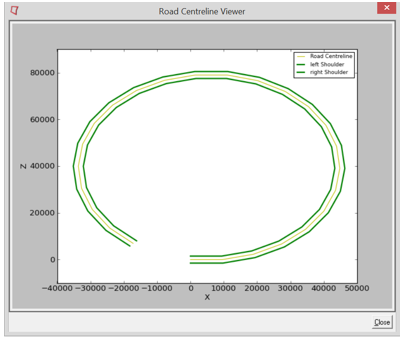
there is an option to preview the centerline. Clicking the Show
Centerline Preview button will open the Road
Centerline Viewer dialog, which contains a plot of the centerline
along with the shoulders of the road.Figure 3. Show Centerline Preview Figure 4. Road Centerline Preview