
Part 2: Solve the Residual Model
Import Geometry
- Open a new SimSolid session.
-
Click
 Import from file .
- In the Open geometry files dialog, choose Plate.x_t.
-
Click Open.
The assembly will load in the modeling window.
Assign Material
- In the Project Tree, open the Assembly workbench.
-
In the Assembly workbench, select
 Apply/review
materials > Apply materials.
Apply/review
materials > Apply materials.
- Select from the Generic materials list.
- Click Apply to all parts.
- Click Close.
Import Superelement
- In the Connections workbench, select Virtual connector > Superelement.
- In the dialog, select appropriate units for Coordinates as [mm], Stiffness matrix as [N/mm], Load vectors as [N], and Mass matrix as [t].
- Select the DMIG file which was exported in Part 1 of this tutorial from File Explorer.
- Click OK.
Create Structural Linear Analysis
In the main window toolbar, click  Structural >
 Structural
linear.
Structural
linear.
Structural >
Structural
linear.
The new analysis appears in the Project Tree
under Design study 1 and the Analysis Workbench
opens.
Create Immovable Support
-
In the Analysis Workbench, select
 Constraints > Immovable support.
- In the dialog, verify the Faces radio button is selected.
-
In the modeling window, select the face(s) highlighted in
orange in the figure below.
Figure 1. 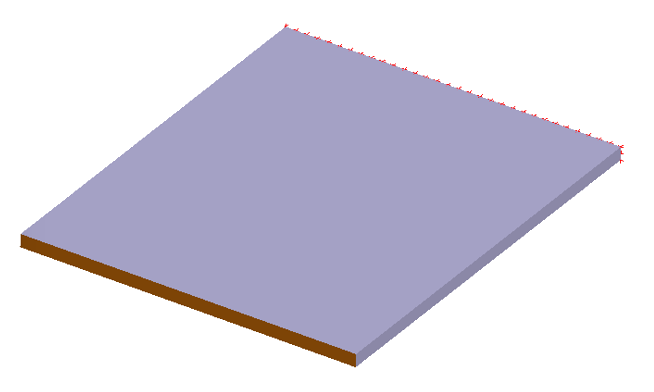
-
Click
OK.
The new constraint, Immovable 1, appears in the Project Tree. A visual representation of the constraint is shown on the model.
Edit Solution Settings
- In the Analysis branch of the Project Tree, double-click on Solution settings.
- In the Solution settings dialog, for Adaptation select Global+Local in the drop-down menu.
- Click OK.
Run Analysis
- In the Project Tree, open the Analysis Workbench.
-
Click
 Solve.
Review Results
- In the , select Structural 1 subcase.
-
In the Analysis Workbench, click
 Result
plot > Displacement > Displacement magnitude.
Result
plot > Displacement > Displacement magnitude.
Figure 2. 
The Legend window opens and displays the contour plot.