
Reload source
Open and Reload source
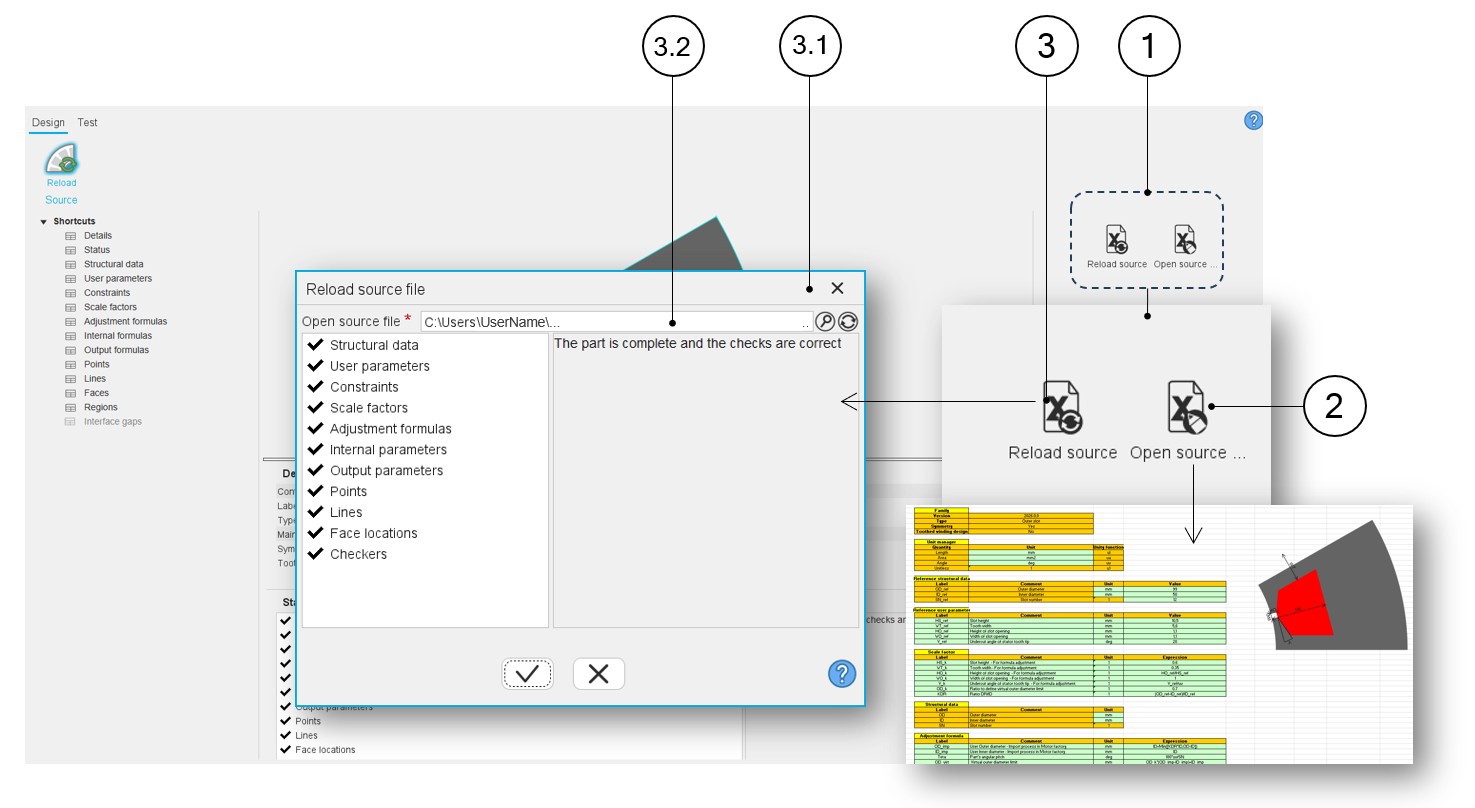
In the design area of the Part Factory, it is possible to modify the data stored in the Excel file.
A group of icons allowing the management of the part based on the Excel file is
available:
- For opening of the associated Excel file
- For reloading the associated Excel file to apply the modifications made in the Excel file
Steps to modify the properties of a part defined in an Excel file:
- Once in the design area of Part Factory, open the Excel file (icon “Open source”) which is associated with the considered part
- Modify the Excel file data
- Save the Excel file
- Reload the Excel file (icon “Reload source”) to apply the new data to the
current part.Note: Verify that all the checkers are correct meaning that the part is compatible with the Motor Factory design processes.
 |
|
|---|---|
| 1 | Group of icons allowing the management of the part based on the
Excel file:
|
| 2 | “Open-source file” allows opening the Excel file associated with
the considered part. It gives access to the whole definition of the part. It represents the way to customize the parts. |
| 3 | Icon to reload the excel file in which all the properties of the
considered parts are defined. “Reload source” means that after loading the excel file, an analysis of its contents gives a status of this part. |
| 3.1 | Dialog box to reload the Excel file and to check that the part is complete and the checks are correct |
| 3.2 | Field to browse the folder and to find the Excel file to be considered. |