
Design
Overview
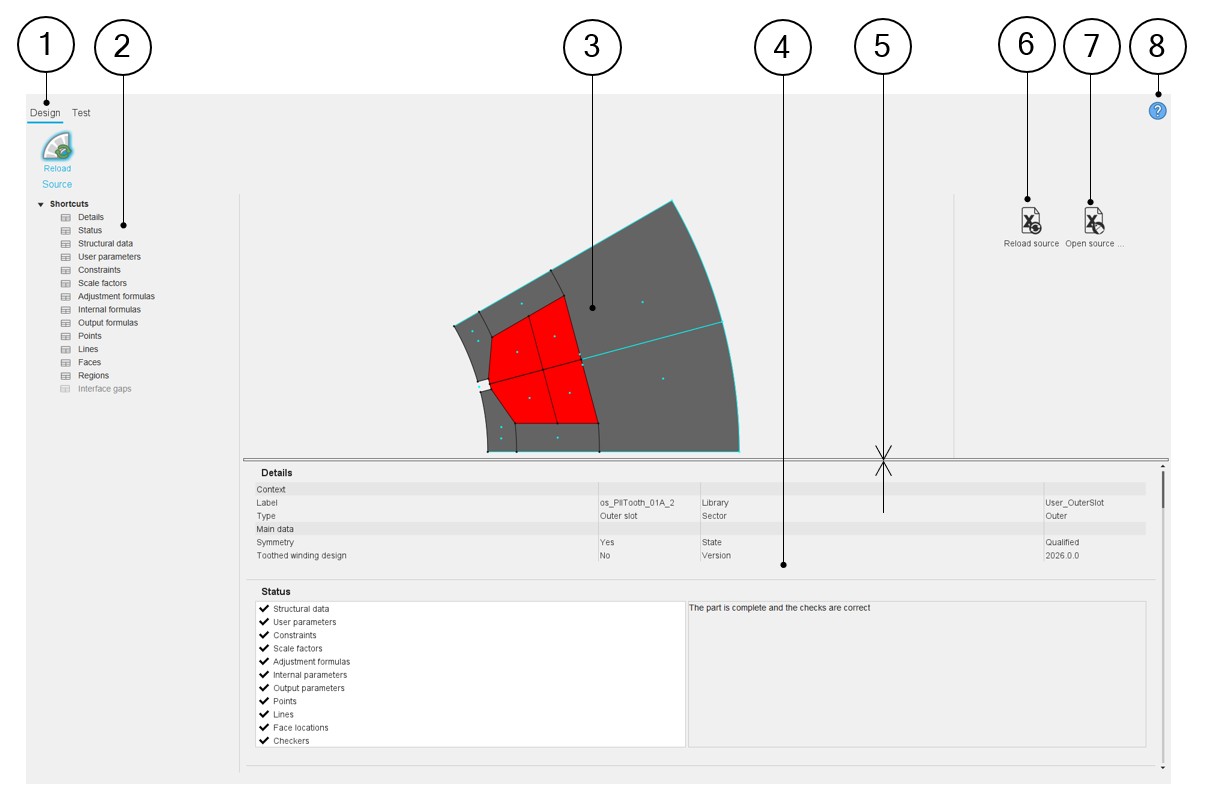
Here are the main zones that compose “Design” environment of the Part Factory.
 |
|
|---|---|
| 1 | Select the Design environment of Part Factory. Note: When Design is selected, it is underlined
and it shows the part properties. |
| 2 | Shortcuts for displaying the corresponding section of the part properties. |
| 3 | The sector that represents the part is displayed on the central screen of the design environment of Part Factory. |
| 4 | Visualization of the part characteristics (part data described in
chapters above etc.) is possible. Scrollbars allow browsing the whole document rapidly and having an overview of all the results. Using scrollbars, complete data can be accessed and visualized. |
| 5 | Dimensions of screens can be adjusted by moving the separator line between the drawing and the table of results. |
| 6 | Icon to reload the excel file in which all the properties of the
considered parts are defined. “Reload source” means that after loading the excel file, an analysis of its contents gives a status of this part. |
| 7 | “Open-source file” allows opening the Excel file associated with
the considered part. It gives access to the whole definition of the part. It represents the way to customize the parts. |
| 8 | Access to the online user help guide dedicated to the usage of the Design environment of Part Factory. |