
Materials
Overview
-
From the supervisor one can get into the “Materials” environment to manage different types of materials.
From the supervisor, click on the button “Materials”.
Table 1. FluxMotor – Supervisor – Manage materials with the application “Materials” 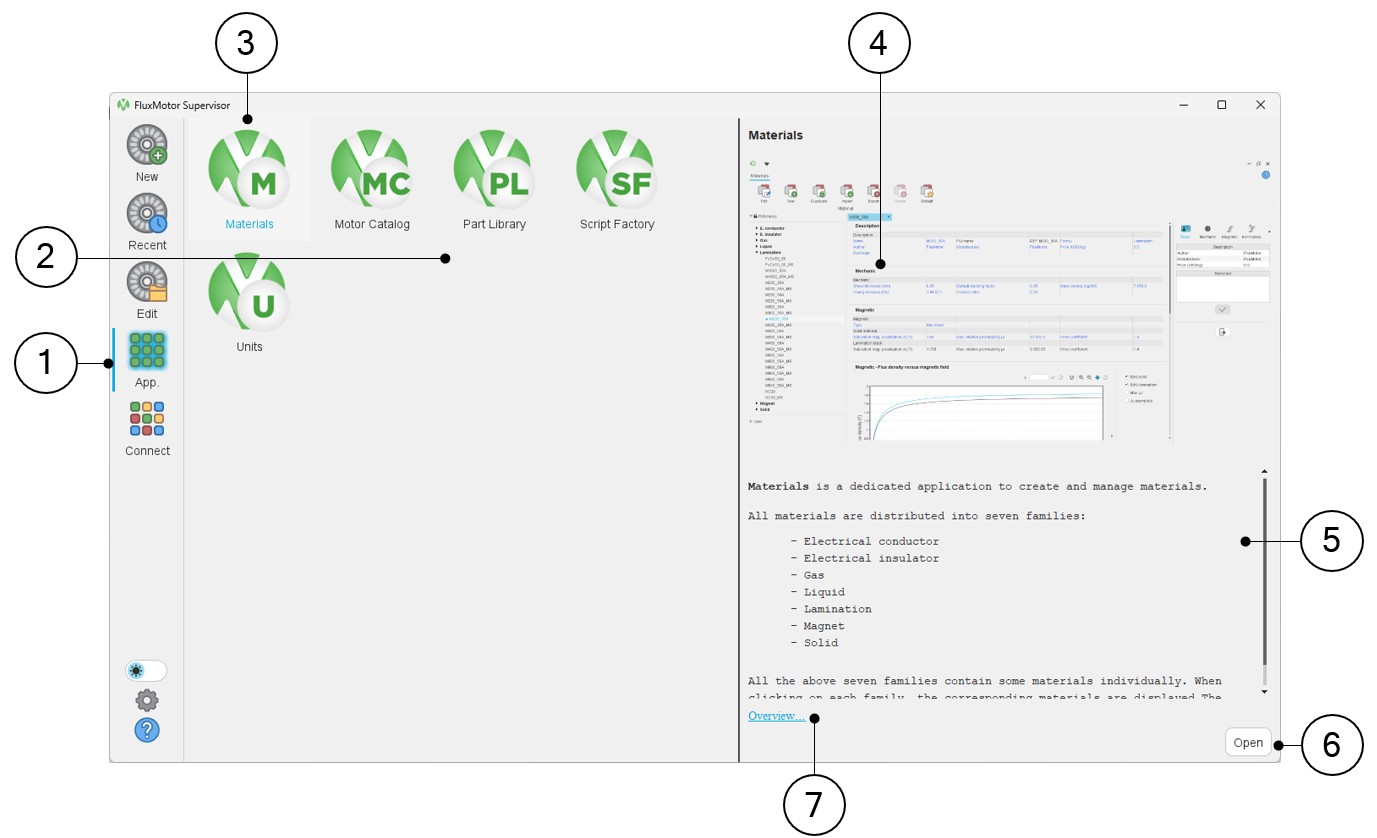
1 Select the button to access FluxMotor applications 2 Icons of FluxMotor applications (Materials, Motor Catalog, Part Library, Script Factory, Units) 3 Selection of the application “Materials” 4 Picture of the selected application: “Materials” in our example. 5 A short description of the selected application. 6 Once selected, the application can be opened either by double clicking on the corresponding icon or by clicking on the button “Open”. 7 A link “Overview” to reach the online user help guide, which described the selected application. - From Motor Factory one can get into “Materials"
From the Motor Factory Design area, it is possible to get into the “Materials” through the Assembly / Materials environment to manage and check the properties of materials.
Table 2. FluxMotor – Motor Factoy Design - Assembly / Materials environment – Access to the materials database 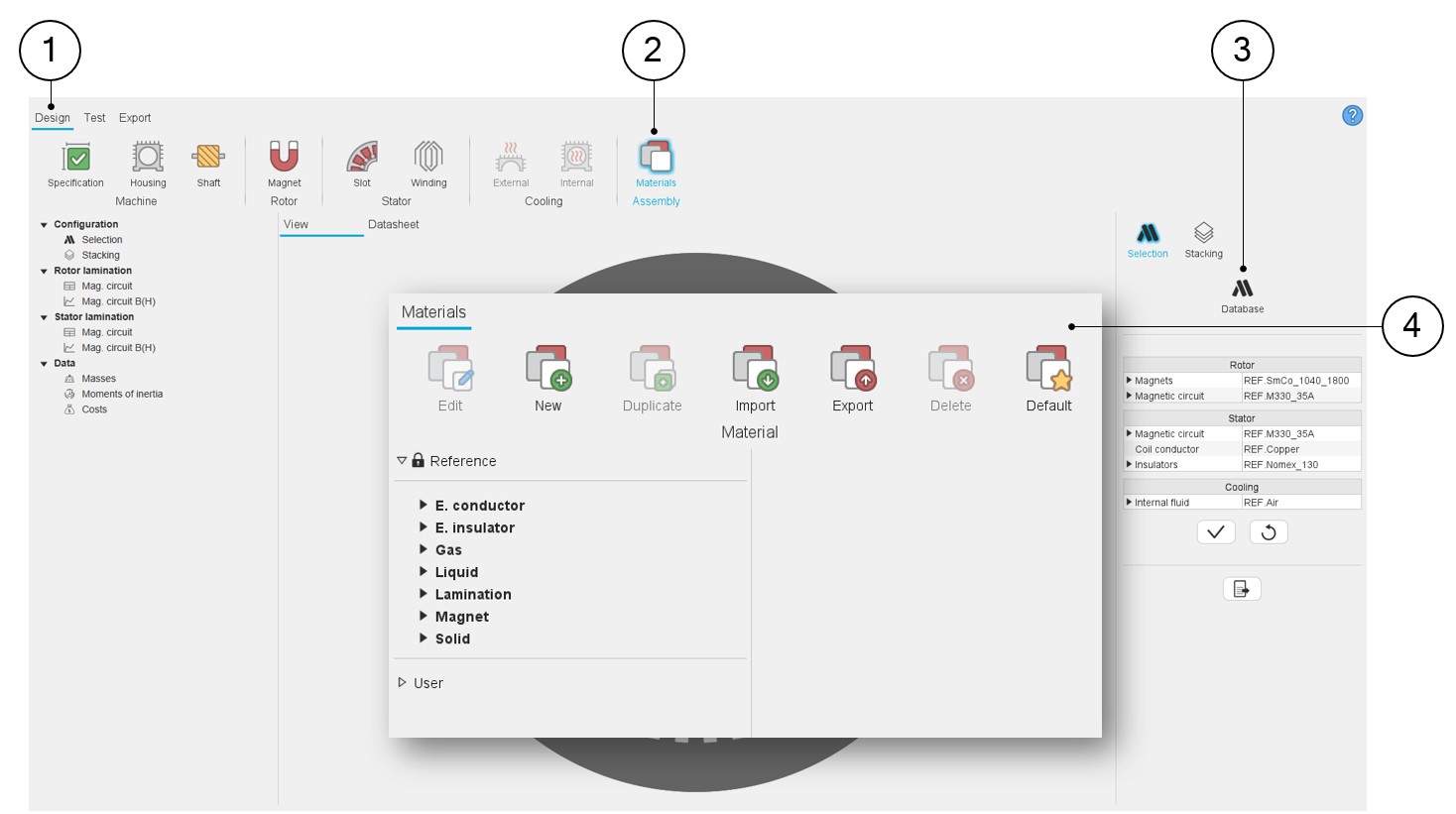
1 Open Motor Factory – Design environment 2 Selection of the Assembly / Materials environment 3 Clicking on the button Database opens the application Materials 4 The application “Materials” is opened and one can manage the materials and check their properties. Note: Standard and user databases are available regardless of how you choose to access “Materials.”Note:In Motor Factory a material from the reference material database has the following prefix:
“REF.” Example: REF.M250.50A. Similarly, a material from the user material database has the following prefix: “USER.” Example: USER.M250.50A.
Warning: When you modify the properties of a material already selected for the design of the machine in question in Motor Factory, you must reassign that material so that the changes made to the properties are taken into account. Otherwise, the properties remain unchanged.
Main areas of “Materials”
- Electrical conductor
- Electrical insulator
- Gas
- Liquid
- Lamination
- Magnet
- Solid
All the above seven families contain some materials individually. When clicking on each family, the corresponding materials are displayed.
Materials are stored in databases: a “Reference” material database is offered. In addition, the users also have the possibility to create their own materials, which will be stored under a “User” material database.
Advice for use
FluxMotor is dedicated to the predesign of electrical motors. The target of Altair® FluxMotor® is to get a quick overview of the technical and economic potential of motors.
The motive of the associated material database is to cover the field of needed materials to build a machine.
So, the aim of the material database is not to give perfectly accurate properties of all the specific materials given by the main material suppliers all over the world.
The objective of the material database is to propose the main types of needed materials required for building a motor to have a general overview of the motor by using different main kinds of materials.
This principle must simply allow visualizing the variation of performance when substituting one material type for another one.
However, the users of FluxMotor will be able to build their own material database by specifying all the properties needed. Specifying accurate properties of materials remains the responsibility of the user.