
Duplicate
Duplicate material
All the materials can be duplicated either from the reference material database or from the user material database.
For any origin of the material (reference or user material database), the new material resulting from the duplication will be stored in the user material database.
Duplicate a material allows creating a new material from one already existing with another name. It is possible to modify (by editing it) the corresponding properties to personalize it.
 |
|
|---|---|
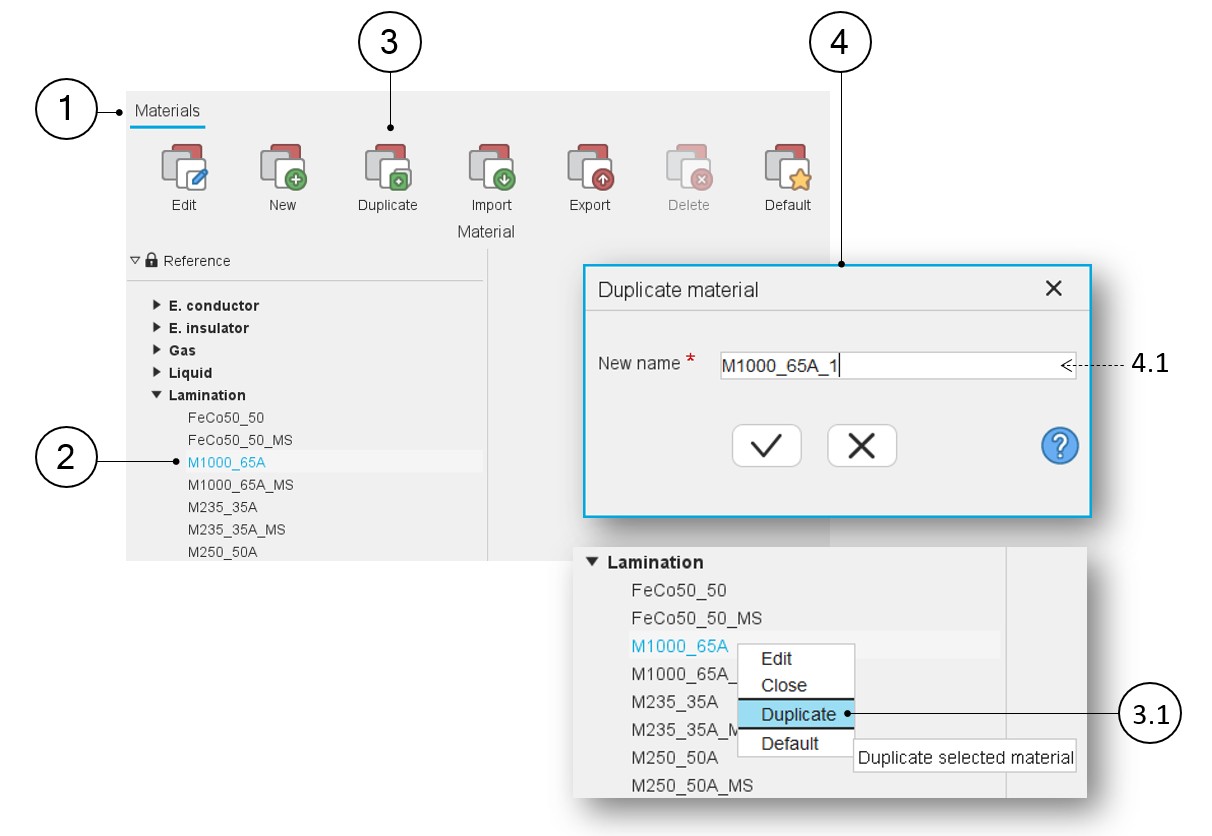
| 1 | The application “Materials” is opened. |
| 2 | In any case, the material to be duplicated must be selected. |
| 3 | The first way to duplicate material consists of clicking on the icon “Duplicate” in the “Materials” menu or by using the right mouse button to expand the corresponding drop-down menu and then clicking on the function Duplicate (3.1). |
| 3.1 | Use the right mouse button to expand the drop-down menu and then click on the function Duplicate. |
| 4 | Once clicking on the icon Duplicate material, a dialog box is opened to define the name. |
| 4.1 | Define the name of the duplicated material. |