
Default
Default materials - Set material as favorite
The aim of this option is to declare a default material for each material family.
Each time a user creates a new machine in Motor Factory, these default materials will be automatically chosen.
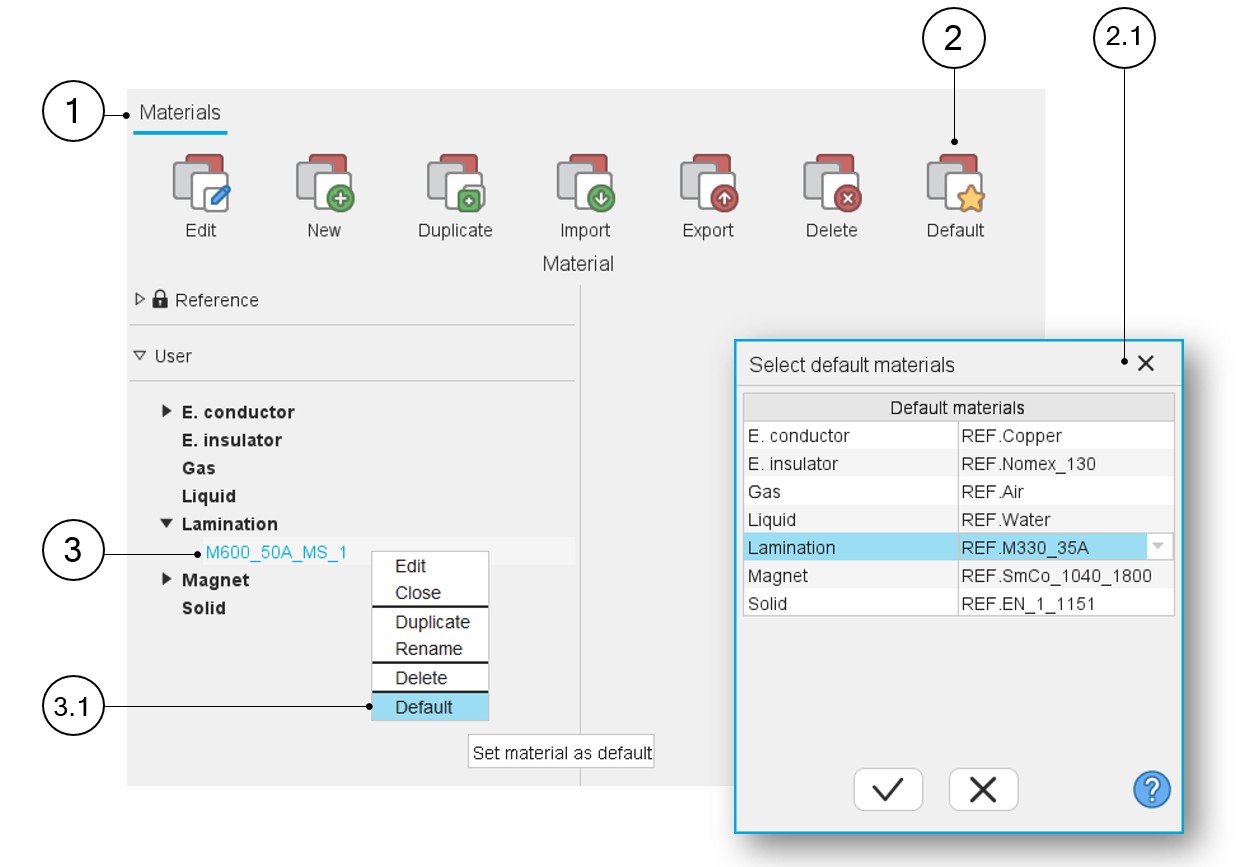
How to set a material as a favorite is illustrated below.
 |
|
|---|---|
| 1 | The application “Materials” is opened. |
| 2 | One way to set a material as default for all the material families consists of clicking on the icon “Default” in the “Materials” menu. A dialog box is opened, and one can select a default material for each material family. |
| 2.1 | The dialog box to select a default material for each material family directly in one go. |
| 3 | To set a material as default, select the name of the material to be set as favorite (default). Then right-click on the material to be set as favorite (default). Refer to 3.1 below. |
| 3.1 | Right Click on the material to be set as favorite (default). A drop-down menu appears with functions such as Edit, Close, Duplicate, Rename, Delete and Default. Select Default. |
Note: A default material can be defined for each family of
material (Electrical conductor, Electrical insulator, Gas, Liquid, Lamination,
Magnet and Solid).