
Delete
Delete material
“Delete” material implies that it is removed from the material database.
Only materials from the user material database can be deleted.
Note: While deleting a material used in the design of an existing
motor, the name of this material and all the corresponding physical properties are
kept in the data of the motor. These are kept if the material is not changed in the
motor. If the material is replaced by another one, the former material (removed from
the material database) won’t be usable anymore.
 |
|
|---|---|
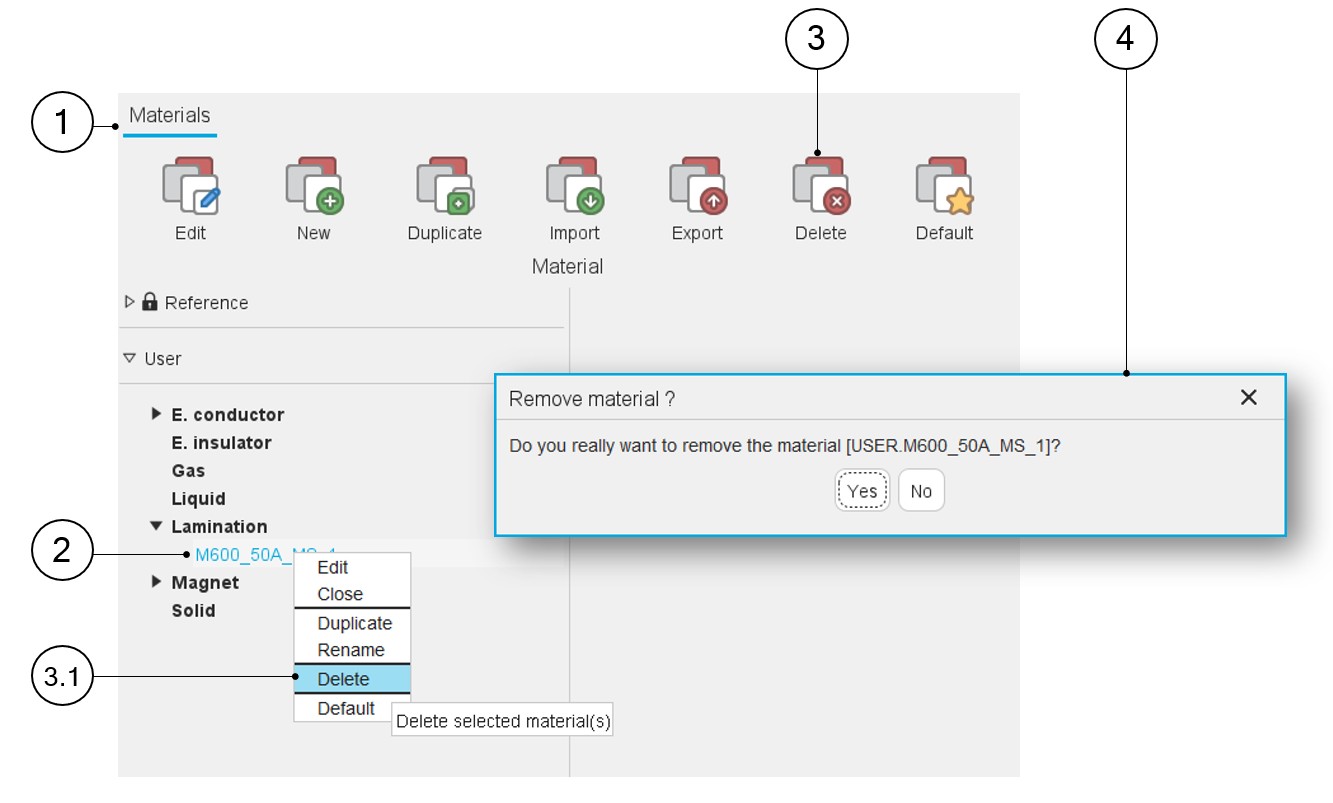
| 1 | The application “Materials” is opened. |
| 2 | Select the name of the material to be deleted. |
| 3 | The first way to delete material consists of clicking on the icon “Delete” in the “Materials” menu or by using the right mouse button to expand the corresponding drop-down menu and then clicking on the function Delete (3.1). |
| 3.1 | Use the right mouse button to expand the drop-down menu and then click on the function Delete. |
| 4 | A dedicated dialog box allows finalizing the deletion of the
selected material. Note: Several materials can
be selected to be deleted. |