
Unload
How to unload a library?
- Unload a library means to cut the link between the folder corresponding to the library and the Part Library application. However, the folder is not removed. It still exists after having been unloaded and it can be reloaded if needed.
- Delete a library means to remove the folder corresponding to the library. In that case all its content will be deleted and can’t be reloaded.
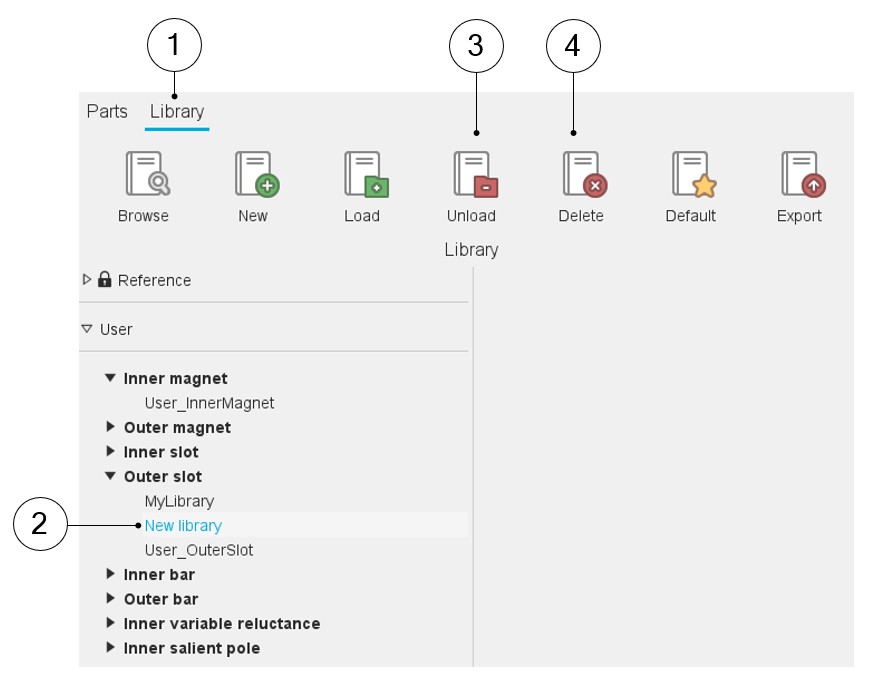
How to Unload or Delete a library is illustrated below.
 |
|
|---|---|
| 1 | Selection of the library area of the Part Library application. |
| 2 | Selection of the library to Unload or to Delete. |
| 3 | Button to Unload the selected library. |
| 4 | Button to Delete the selected library. |
Note: Unload and Delete can be accessed by right Clicking on the
considered library to be unloaded or deleted via a drop-down menu where functions
such as Browse, Default, Rename, Unload and Delete are available.