
Load
How to laod a library?
As explained in the previous section, a library corresponds to a folder in which all the data relative to parts are stored.
Load a library allows us to create a link between the folder corresponding to the library and the Part Library application.
 |
|
|---|---|
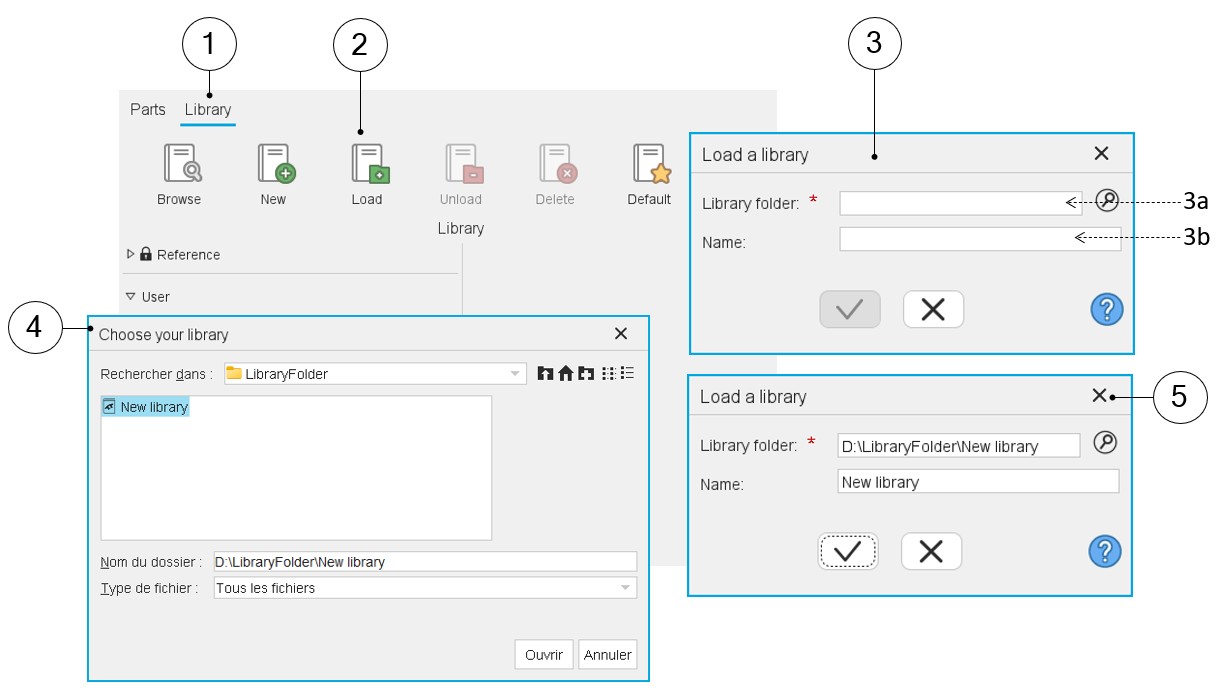
| 1 | Selection of the catalog area of the Part Library application. |
| 2 | Click on the button “Load a library”. Note: The library is loaded in the user’s library. |
| 3 | Clicking on the button “Load a library” opens a dedicated dialog box. |
| 3a | The folder in which the targeted library is stored must be selected. |
| 3b | The name that will be assigned to the loaded library. |
| 4 | Dialog box to browse into folders and to reach the library to be loaded. |
| 5 | Dialog box filled with the information provided by the user. |