
Since version 2026, Flux 3D and Flux PEEC are no longer available.
Please use SimLab to create a new 3D project or to import an existing Flux 3D project.
Please use SimLab to create a new PEEC project (not possible to import an existing Flux PEEC project).
/!\ Documentation updates are in progress – some mentions of 3D may still appear.
Automatic mesh generator
Definition
An automatic mesh generator (AUTOMATIC) creates the following elements:
| face elements | volume elements |
|---|---|
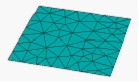
 |
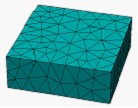
 |
| Triangle | Tetrahedron |
Use
The automatic mesh generator is the Flux default mesh generator.
It is not necessary to assign the automatic mesh generator to faces / volumes. By default Flux uses the automatic mesh generator to generate the mesh on the parts of device to which no mesh generator is assigned.
3D specificity
The aided mesh generator,( AIDED MESHGENERATOR) with cutting by deviation, is created and assigned by default to the distorted faces within the framework of aided mesh (global adjustment).
It is also possible in 3D to create other automatic mesh generators by the deviation option (local adjustment).
Mesh adjustment
To adjust the size of the elements, two following modes can be used:
- via the points, i.e. by using the mesh points
- via the lines, i.e. by using the mesh lines
A mode of mesh adjustment via the points is recommended because isotropic (equivalent in all directions).