
Since version 2026, Flux 3D and Flux PEEC are no longer available.
Please use SimLab to create a new 3D project or to import an existing Flux 3D project.
Please use SimLab to create a new PEEC project (not possible to import an existing Flux PEEC project).
/!\ Documentation updates are in progress – some mentions of 3D may still appear.
Mesh elements and mesh defects
Introduction
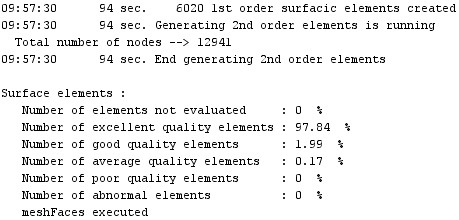
Once the mesh has been generated, a mesh report is created in the history zone. The mesh elements and the possible mesh faults appear in the data tree.
Mesh report
The mesh report appears in the history zone.
Example of a mesh report:
Mesh elements
The mesh elements are:
- the nodes (2D/3D)
- the linear elements (2D/3D)
- the surface elements (2D/3D)
- the volume elements (3D)
Mesh defaults
The mesh defaults are:
- the faulty surface elements in 2D
- the faulty volume elements in 3D