Since version 2026, Flux 3D and Flux PEEC are no longer available.
Please use SimLab to create a new 3D project or to import an existing Flux 3D project.
Please use SimLab to create a new PEEC project (not possible to import an existing Flux PEEC project).
/!\ Documentation updates are in progress – some mentions of 3D may still appear.
Assign mesh shadow to faces
Assign mesh shadow
To assign a Shadow Face to the faces:
| Stage | Action | |
|---|---|---|
| 1 | Activate the command Assign shadow to faces (see next block) | |
| → | An assignment box is opened. | |
| 2 |
Complete the assignment box:
|
|
| → | The shading has been assigned to the faces. | |
| → | An assignment box is opened. | |
| 3 |
Continue the sequence of assignment:
|
Quit the sequence of assignment:
|
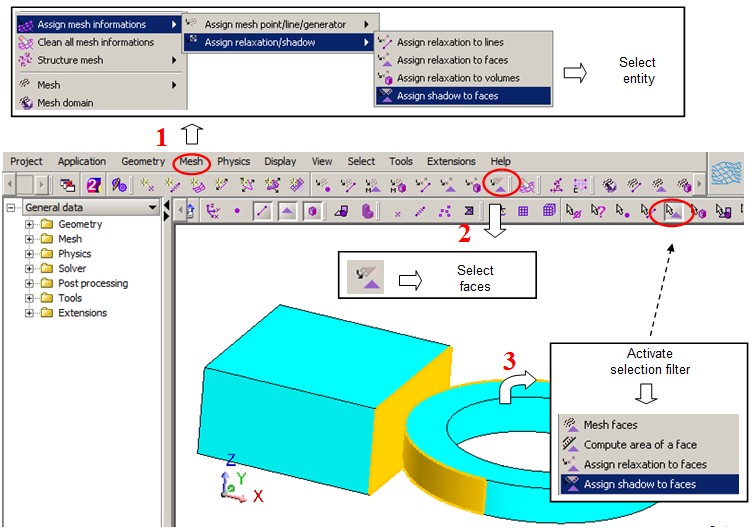
Activate the command
To activate the command Assign shadow to faces, which requires the selection of data, choose one of the methods in the following figure: