
Particle Factory

The Particle Factory panel is used to specify the inflow boundary condition for Particle flow simulations.
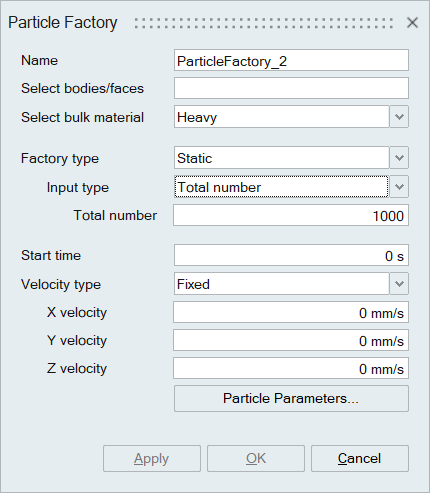
Select faces/bodies:
- The select faces / bodies is used to select the faces/face groups/bodies that should be specified with inflow boundary.
Select faces:
- The select faces option is used to select the faces/face groups of volume meshed bodies that should be specified with inflow boundary condition.
Select bulk material:
- This option used to select bulk materials from the imported edem h5 file.
- To import the edem h5 material, go to Material browser | Materials | right click, select Import EDEM Material DB option, and select the h5 file, which user can create in EDEM interface.
Factory type: User can specify Static and Dynamic particle factories
Input type:
- The option used to control the number of particles generated either total number or unlimited.
- Total number - Specify the total number of particles to be created at the inlet.
- Unlimited number - By default it considers 1 million particles.
- Fill section – Added for static factories.
- Total mass – Specify the total mass of the particles.
Generation rate:
- Target number - Specify the total number of particles to be generated per second at the particle inlet.
- Target mass - Specify the target mass of the particles to be generated per second.
Start time:
This option used to specify the start time for particle creation.
Velocity type:
Particles can be given a velocity at the time of creation. Options are:
| Velocity Type | Input Details |
|---|---|
| Fixed | Velocity component values in the X, Y and Z |
| Linear distribution | The particles are given velocities that fall on the line segment between the two velocity vectors provided by user. Start and End velocity. |
| Normal distribution | The particle direction, mean velocity and the standard deviation must be defined. |
| Random | Each particle is given a velocity at random within a defined range of minimum and maximum. |
| Spray | The particles are formed in a conical spray. The spray direction is defined as a velocity vector. The angle is the angle of maximum deviation from the normal. The mean velocity and standard deviation must also be defined. |
Particle Parameters :
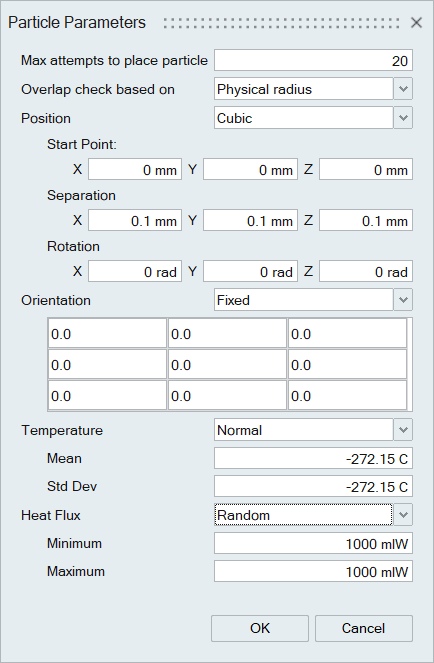
- Max attempts to place particles – Particle created at the inlet can never be placed one on top of another. This parameter set the max. number of attempts to find free space to place a particle.
- Overlap check based on – Check if there is any overlapping of particles created at the inlet based on the radius of the particles.
Particle Parameters Table :
| Particle Parameters | Description | Type | Data and Unit |
|---|---|---|---|
| Position | Specifies the arrangement of the particles | Random | - |
| Cubic | Start point, Separation, Rotation | ||
| Body-Centered Cubic (BCC) | Start point, Separation, Rotation | ||
| Face-Centered Cubic (FCC) | Start point, Separation, Rotation | ||
| Orientation | Particle can be oriented in a specified way at the time of creation | Random | |
| Fixed | Orientation Matrix | ||
| Temperature | Specifies the temperature of the Particle | Fixed | Value in K |
| Normal | Mean and Std Dev in K | ||
| Random | Min and Max value in K | ||
| Heat Flux | Specifies the heat flux of the Particle | Fixed | Value in W |
| Normal | Mean and Std Dev in W | ||
| Random | Min and Max value in W |