Stress gradient effect can be taken into consideration through
either FKM guideline method or Critical Distance method.
The stress gradient effect is supported for both shells and solid elements. For solid
elements, the stress gradient effect is only available with nodal evaluation and for
shell elements, the stress gradient effect is only available with elemental
evaluation.
The Stress Gradient method is currently supported for Uniaxial and Multiaxial SN, EN
with Time series loading. It is not supported for Dang Van FOS, Weld, Vibration, and
Transient Fatigue analyses.
FKM Guideline Method
In the FKM guideline method, stress gradient effect is considered by increasing
fatigue strength by a factor calculated using a rule in FKM guidelines. In OptiStruct implementation of FKM guideline method, 6 components of a
stress tensor at each time step is reduced by the factor provided by FKM
guidelines.
To activate Stress Gradient effect using FKM guideline method, Stress Gradient should
be set to FKM Guideline in SN/eN dialog. The equivalent stress σeq method
to calculate stress gradient should be specified.
The following steps are followed to reduce stresses at the surface to take stress
gradient effect into consideration.
Calculate stress gradient of 6 components of a stress tensor, , at each time step after linear combination
of stress history. z-direction is an outward surface normal. For a solid
element, the gradient is calculated by finite difference between stress at
surface and stress at 1mm below the surface. The stress at 1mm below surface
is an interpolated stress from grid point stresses of an element of
interest. In case of 2nd order solid elements, only grid point stresses at
corners are used for interpolation. For shell elements, the gradient is
calculated from stresses of both layers and its thickness.
Using the stress gradient obtained in Step 1, a gradient of equivalent
stress in the surface normal direction, , is calculated in an analytical way at each
time step. The equivalent stress can be either von Mises stress or absolute
maximum principal stress.
The related stress gradient, is calculated using the following
normalization.
Apply the correction factor to the surface stress tensor to obtain
reduced surface stress. Apply the same to corresponding strain tensor to obtain
reduced strain tensor when EN fatigue analysis is to be carried out with
nonlinear analysis.
Correction Factor Calculation
Correction factor calculation is based on relationship between and described in the FKM guidelines.
According to FKM guidelines, the stress correction factor is determined by:
Table 1. Example values for Constants and
Constants
Stainless Steel
Other steels
GS
GGG
GT
GG
Wrought Al-Alloys
Cast Al- Alloys
0.40
0.50
0.25
0.05
-0.05
-0.05
0.05
-0.05
2400
2700
2000
3200
3200
3200
850
3200
Where,
GS
Cast Steel and Heat Treatable cast steel for general purposes.
GGG
Nodular Cast Iron.
GT
Malleable Cast Iron.
GG
Cast Iron with lamellar graphite (grey cast iron).
is UTS in MPa and dimension of is mm. OptiStruct takes care of the
unit system for and through stress units defined in
Material and stress unit and length unit defined in SN/eN
dialog. and values are user input in
Material under FKM Stress Gradient tab of My
Material. Since the stress gradient has to be calculated in length
dimension of mm, define the length units so that OptiStruct can
properly locate a point that is 1mm below the surface. If is negative, is set to 1.0. If is greater than 100 mm-1, is set to 1.0 with a warning message.
User-defined Relationship
User-defined relationship between and can be specified through a TABLE
(pairs of (xi,yi) = ( , ) in My Materials. If falls outside the range of xi, will be extrapolated. This means that can be lower than 1.0 when is negative depending on how is treated when being negative or greater than
100mm-1. The user-defined relationship takes precedence over the one in FKM
guidelines.
Critical Distance Method
To activate Stress Gradient effect using
Critical Distance method, the GRD field on
FATPARM should be set to GRDCD.
Small
stress concentration features or geometries with high stress gradients are less
effective in fatigue than larger features or smaller gradients with the same maximum
stress. A plate with a small hole, say 0.1 mm, has a much longer fatigue life than
one with a large hole of 10 mm even though both plates have the same stress
concentration factor and maximum stress. In conventional fatigue analysis, the
stress gradient effect is taken into account by using an empirical fatigue notch
factor, Kf, rather than the stress concentration factor Kt. Since there is no
concept of a Kt or nominal stress in a finite element model, stress gradient effects
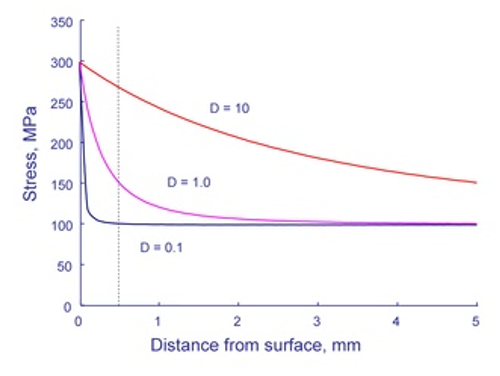
are considered directly. Figure 1 below shows the stress distribution in a plate for three different hole sizes.
All of the holes have the same maximum stress, three times the nominal stress.Figure 1.
The figure shows that the stresses are independent of size only at the
edge of the hole and very far from the hole. The dashed line in the figure is drawn
at 0.5 mm. Here the stresses increase as the size of the hole increases. Suppose
crack nucleation mechanisms result in a crack with a size of 0.5 mm. For the
smallest hole, 0.1 mm, the stress available for continued growth is only 100 MPa,
the nominal stress. The same size crack is subjected to a stress of 275 MPa in the
larger hole, nearly equal to the maximum stress.
For nucleation of a crack
around a hole of different sizes, it is useful to think about a process zone for
crack nucleation. Materials are not continuous and homogeneous on the size scale
that crack nucleation mechanisms operate. The grain size of the material is a
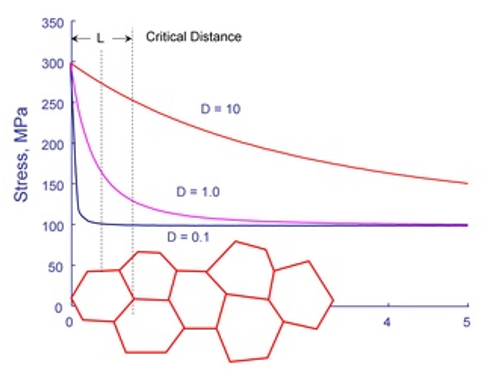
convenient way to visualize the fatigue process zone. Figure 2 shows the grain size superimposed on the stress distribution from Figure 1. What is the stress in the process zone? A simple first approximation would be to
take the stress in the center of the grain. Thus, a stress of 275 MPa would be used
to compute the fatigue life of a 10 mm hole and a stress of 100 MPa would be used
for the 0.1 mm hole.Figure 2.
In the modern view of fatigue, when a material is stressed at the
fatigue limit, a microcrack forms but does not grow outside of the process zone.
Stress gradient effects are included in the fatigue analysis in a very simple and
straightforward manner. In Critical Distance method, stresses and strains at a
distance L/2 (Point Method) from the surface are used rather than the surface
stresses and strains. For solid elements, the stress and strain at L/2 below surface
is an interpolated stress and strain from grid point stresses and strains of an
element of interest. In case of 2nd order solid elements, only grid point stresses
and strains at corners are used for interpolation. The critical distance can be
expressed in terms of the threshold stress intensity, , and fatigue limit range, as:
The critical distance is a unique material property. If
the critical distance of the material in use is known, you can input the critical
distance in MATFAT after keyword STSGRD. When
you input the critical distance, it is important to define dimension of length in
MATFAT as well. Computing the critical distance from the
threshold stress intensity, however, is difficult because the threshold stress
intensity, particularly for small microcracks, is usually unknown. Fortunately,
there is a good direct correlation between the critical distance and fatigue.
If you do not directly input the critical
distance, OptiStruct uses the above equation to estimate
the critical distance in SN fatigue analysis. Fatigue limit is taken after the SN curve adjustment. The
dimension of L is mm.
In EN fatigue analysis, the fatigue limit is approximated by:
Where,
Fatigue strength coefficient.
Reversal limit of endurance.
Young’s Modulus.
If 0 or the calculated is greater than 0.2 mm, is set to 0.2 mm. In case of shell elements, the
maximum calculated is thickness/4.
Input to Activate Stress
Gradient Effect:
Choose a method (FKM guideline or Critical Distance) to use
on the GRD field after keyword STRESS in
FATPARM. If the FKM guideline method is chosen, the
equivalent stress method to calculate stress gradient should be
specified on the SCBFKM field in FATPARM.
Material properties required for stress gradient effect are to be input after
keyword STSGRD in MATFAT.
1 Atzori,
Meneghetti and Susmel, "Material fatigue properties for assessing mechanical
components weakened by notches and defects" Fatigue and fracture of Engineering
Materials and Structures, Vol. 28, 83-97, 2005