
Create a Zigzag Fold
Two zigzag types are available:Figure 1.
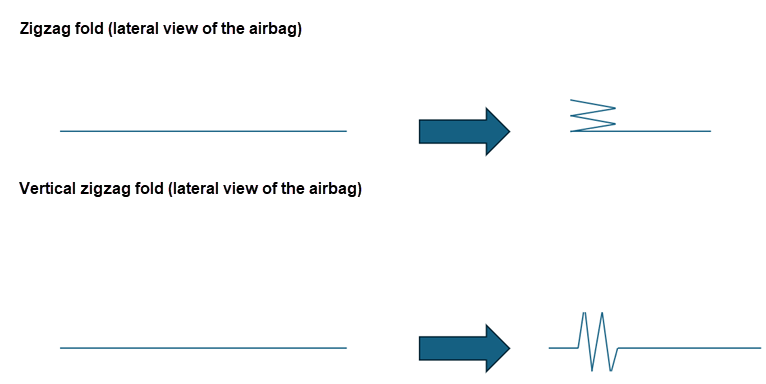
- Lateral
- Vertical
-
From the Airbag ribbon, click the
Zig-Zag tool.
Figure 2. 
-
On the guide bar, click
 to define
the parameters.
to define
the parameters.
- Number of plies: The total number of plies.
- Plies length: The length of each plies.
- Angle: The rotation angle of each simple fold made to obtain the zigzag fold.
- Z translation: For a simple fold or a roll fold, this must be used when the area folded already has many layers that were caused by previous folds.
- Activate vertical zigzag.
- Top fold height/Bottom fold height. See Figure 3.
- Front length: Moves the folding line to the “rear”.
Figure 3. 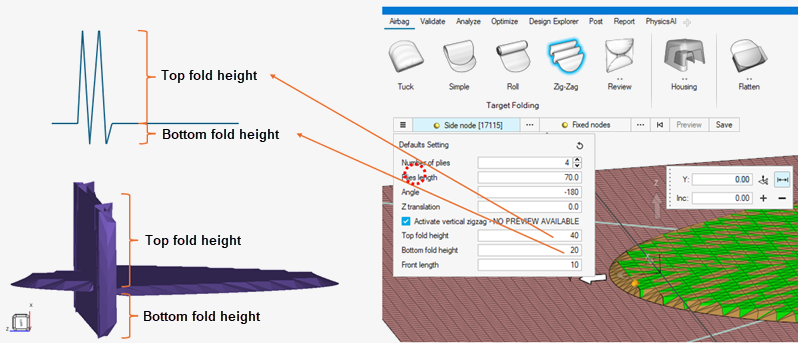
- On the guide bar, click Side node to select a node that defines the side of the fold.
- On the guide bar, click Fixed nodes to select nodes that will be unaffected by the zigzag fold.
-
Set advanced selections as necessary by clicking
 on the guide bar.
- On the guide bar, click Preview to preview the fold.
-
On the guide bar, click Save to
save the fold definition.
The zigzag fold is displayed in the Airbag Solution Browser.