
Since version 2026, Flux 3D and Flux PEEC are no longer available.
Please use SimLab to create a new 3D project or to import an existing Flux 3D project.
Please use SimLab to create a new PEEC project (not possible to import an existing Flux PEEC project).
/!\ Documentation updates are in progress – some mentions of 3D may still appear.
Delete / Force delete
| To delete … | use the command … |
|---|---|
|
independent entities (non-connected with other entities) |
Delete |
|
any entity + all connected entities |
Force delete |
Delete entities
To delete / delete in force an entity or several entities:
| Step | Action |
|---|---|
| 1 | Activate the Delete / Force delete command (see next block) |
| → | A confirmation box is open. |
| 2 |
Confirm the deletion:
|
Activate the command
To activate the Delete / Force delete command, which requires data selection, choose one of the methods presented in the figure below:
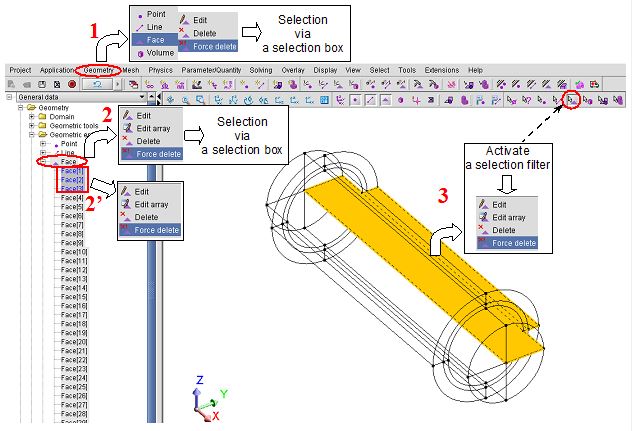
- To open a contextual menu, use the right button of the mouse.
- For multiple selections, keep the Ctrl key pressed.