
Part
Simulate the change of part in Motor Factory
The parts are built to be used in the Motor Factory.
In Motor Factory, in the Design environment, whatever the type of part is (Slot, Magnet, Bar, Pole, Saliency) it is possible to modify the topology (the shape). This corresponds to the importation of a part in the Motor Factory from the “Part Library”.
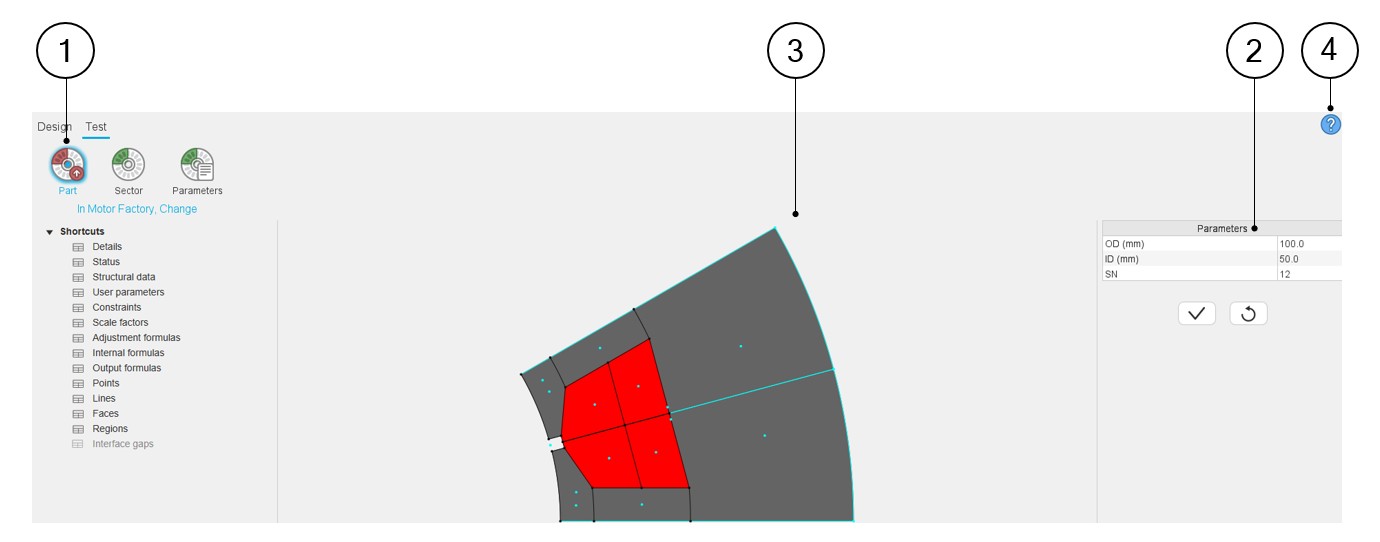
In Part Factory, the Part function of the test area allows testing the capability of the considered part to be imported in Motor Factory and by considering the sector defined with specific structural data.
Below is the illustration of the Test environment and import Part function.
 |
|
|---|---|
| 1 | Section of the first test function: Function to simulate the
change of part in Motor Factory. It allows testing the capability to import the part in a sector, whose three main dimensions are defined in zone 2. |
| 2 | User input parameters to define the three main dimensions of the reference sector (structural data). |
| 3 | The sector that represents the part is displayed on the central
screen of the design environment of Part Factory. In Part
Factory, intersection of lines can be viewed. Note: A right click on the mouse allows
resetting the zoom if the part becomes invisible. This
allows to export a picture in a *.png
format. |
| 4 | Access to the online user help guide dedicated to the usage of the Test environment of Part Factory. |