
Since version 2026, Flux 3D and Flux PEEC are no longer available.
Please use SimLab to create a new 3D project or to import an existing Flux 3D project.
Please use SimLab to create a new PEEC project (not possible to import an existing Flux PEEC project).
/!\ Documentation updates are in progress – some mentions of 3D may still appear.
Point: about
Points
Points can be created:
- manually (entering coordinates)
- by propagation from existing points, with the aid of transformations
- within the propagation or extrusion from other entities
Point coordinates
A point could be defined by its coordinates in a coordinate system for definition (see Coordinate system: about).
Point defined by propagation
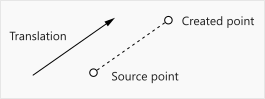
A point could be defined by propagation from another point with the aid of a transformation.
Nature of points
Flux allows the user to modify the consideration of points in the building algorithms for face and for the mesh.
A specific feature, called nature, is attached to the points. There are some examples of nature attribute using in section Geometry building module of chapter Geometry: principles.
Parameter setting
The point coordinates can be defined using algebraic expression. The algebraic expression can contain:
- constants
- geometric parameters (created beforehand)
- basic mathematical functions using operators: +, -, *, /, ( )
- usual mathematical functions admitted by FORTRAN.
The mathematical functions are described in section Functions.