Since version 2026, Flux 3D and Flux PEEC are no longer available.
Please use SimLab to create a new 3D project or to import an existing Flux 3D project.
Please use SimLab to create a new PEEC project (not possible to import an existing Flux PEEC project).
/!\ Documentation updates are in progress – some mentions of 3D may still appear.
Result Preview: Multi-parametric scenario
Introduction
The results preview during the solving is also available when the scenario is multi parametric.
What abscissa?
- The time parameter if it is a transient study
- The last of the physical parameters chosen in the scenario if there is at least one physical parameter
- The last of the geometric parameters if there are only geometrical parameters in the scenario
Multi parametric display
The current curve is displayed with a continuous line.
The n-1 curve is displayed with an dotted line.
The other curves are shaded.
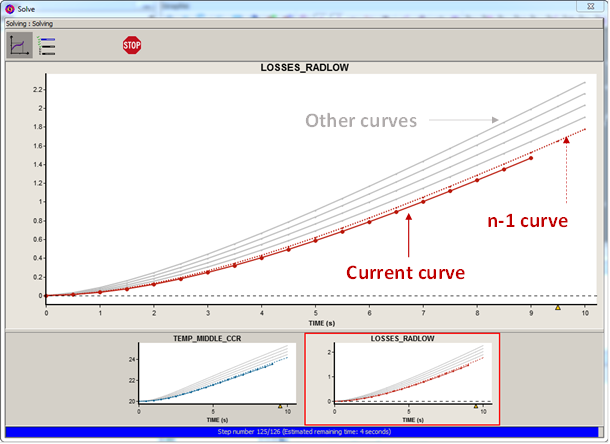
Multi-parametric superimposition
Only the curves being calculated for a given set of parameters are superimposed. All curves already calculated (gray and dotted curves) are not displayed.