
Store
How to store a file?
The Script Factory editor is located at the center panel of the application, and it allows to edit the python script in the usual way.
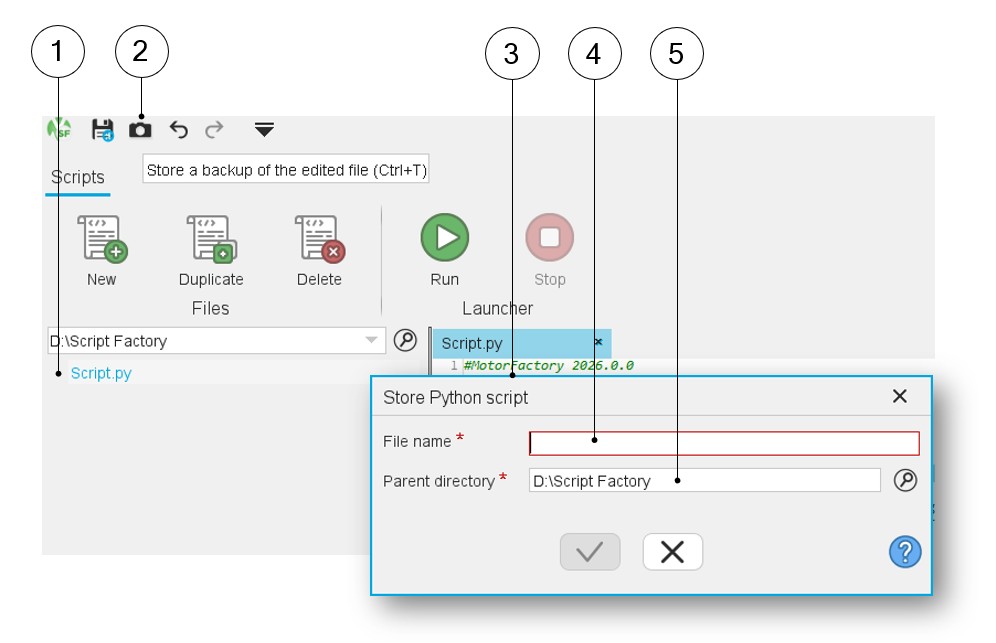
In the Script Factory application, a selected python file from the workspace tree can be stored.
 |
|
|---|---|
| 1 | Select a python file in the workspace tree. |
| 2 | Click on the icon “Store” via the top expanded menu. |
| 3 | Dialog box to store the python script. |
| 4 | Give a name to the python script you want to store. |
| 5 | Select a parent working directory (The default one is the current workspace). |
Note: To “Store” a file you can also use the classical keyboard
shortcut “Ctrl+T”.