
Solver Settings

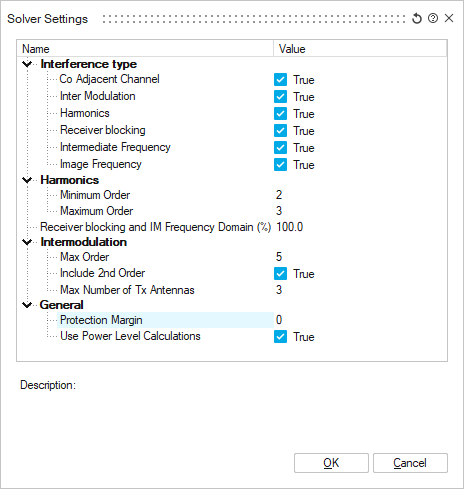
The Solver Settings dialog allows adjusting the Interference type, harmonics and intermodulation options for a co-site interference calculation.
Interference Type
Select which interference type to include in the co-site interference calculation. By
default all types are calculated.
- Co Adjacent Channel interference occurs when devices are using channels that are next to each other or overlap.
- Intermodulation occurs when radio signals mix in a system and generate interfering signal components.
- Harmonics interference consider periodic signals of different orders.
- Receiver blocking is the value strong signals are affecting the sensitivity of the receivers.
- Intermediate frequency (IF) interference is the interference that occurs when the carrier frequency is mixed up or down in transmission or reception.
- Image frequency interference is the result of the undesired input of the carrier signal plus or minus the IF signal.
Harmonics
Specify the minimum and maximum order considered for harmonic signal interference.
Intermodulation
Specify the maximum order, if the second order is included and the maximum number of transmitter antennas considered in the calculation.
General
- Specify the protection margin in dB which would be the difference between the desired signals power level and the level of interfering signals.
- The use power level calculations are turned on by default and calculates the margin value which indicates the severity of the interference and implicitly gives advice on the amount of improvement in performance that is necessary to remedy the interference case.