
Solve and Results

The Co-site solver is executed and the following Cosite Results dialog is displayed.
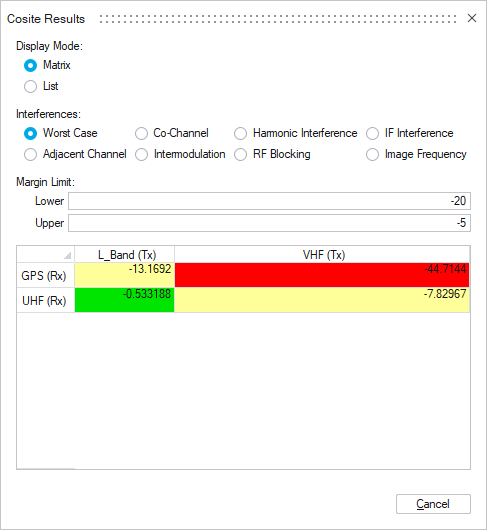
Display Mode
Select Matrix or List to toggle the result display.
Interferences
Select the interference type to be viewed. The default selection is Worst Case.
Margin Limit
Specify the upper and lower limits. The display color of the entries varies:
- Red: Values below the lower margin.
- Yellow: Values within the margin range.
- Green: Values above the upper margin.
Confidence Level
Hover over Matrix Result Display, the corresponding Receiver Frequency, Transmitter Frequency, Confidence Level and Interference Type is displayed.
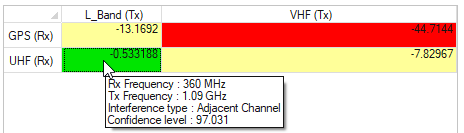
The confidence level is computed using the formula:
Confidence level =
100*(1-|d|/f)
where:
- d = difference between the carrier frequency and the closest frequency.
- f = closest frequency.