
Since version 2026, Flux 3D and Flux PEEC are no longer available.
Please use SimLab to create a new 3D project or to import an existing Flux 3D project.
Please use SimLab to create a new PEEC project (not possible to import an existing Flux PEEC project).
/!\ Documentation updates are in progress – some mentions of 3D may still appear.
Transformation: about
Principle of use
The transformations are geometric functions that permit the creation of new objects, starting from objects already created.
Various functions
The various available functions are:
- translation
- rotation
- affinity
- helix
- composed
Translation
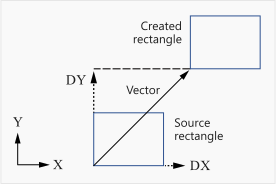
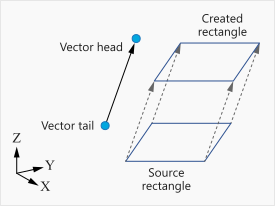
A translation is defined by a direction and a distance.
| 2D domain | |
|---|---|
| Translation vector | Translation defined by 2 points and a ratio |
|
|
|
|
Rotation
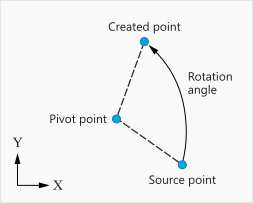
A rotation is defined by a rotation axis and an angle.
| 2D |
|---|
| Rotation defined by angles and a pivot point (its coordinates or reference number) |
|
|
Affinity
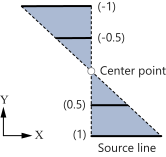
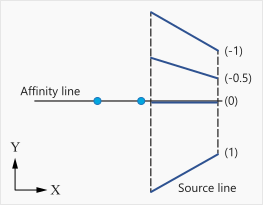
Affinity is defined with respect to a point or to a straight line .
The result of this transformation application depends on the affinity ratio (see the table below).
| Ratio | Result |
|---|---|
| k = -1 | symmetry |
| k = 1 | identity |
| k = 0 | projection |
| k > 1 | increasing (increasing homothety) |
| 0 < k < 1 | reducing (reducing homothety) |
| k < -1 | increasing (increasing negative homothety) |
| -1 < k < 0 | reducing (reducing negative homothety) |
| 2D domain | |
|---|---|
| Affine transformation with respect to a point | Affine transformation with respect to a line |
 |
|
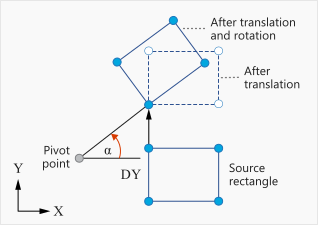
Composed transformation
It is possible to create composed geometric functions.
| Domain 2D |
|---|
| Transformation combining two transformations |
 |
|
Parameter setting
The characteristics of transformation are parametrized expressions. The vector components, the coordinates of pivot point, the rotation angles and the ratios of affinity can be defined using algebraic expression.
The algebraic expression can contain:
- constants
- geometric parameters (created beforehand)
- basic mathematical functions using operators: +, -, *, /, ( )
- usual mathematical functions admitted by FORTRAN.
The mathematical functions are described in section Functions.