
Since version 2026, Flux 3D and Flux PEEC are no longer available.
Please use SimLab to create a new 3D project or to import an existing Flux 3D project.
Please use SimLab to create a new PEEC project (not possible to import an existing Flux PEEC project).
/!\ Documentation updates are in progress – some mentions of 3D may still appear.
Magneto Static face (3D) / line (2D) region
Introduction
The face (in 3D) / line (in 2D) regions are:
-
either material regions: used to model thin regions in the study domain
-
or non-material regions: used to impose boundary conditions (BC) inside or on the frontiers of the study domain
Material regions (thin regions)
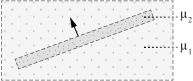
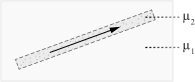
Thin regions enable the modeling of regions of slight thickness (cracks, air-gap, current sheets, etc.).
The thin regions are described in the same way as the massive regions; with in addition the thickness of the region
The following thin region types are available for a 2D and 3D applications:
- Air-gap (= Air or vacuum) / in 2D and 3D
- Magnetic * / in 3D
- Coil conductor / in 2D
| Thin region | Direction of fields H and B | ||
|---|---|---|---|
| no restriction | quasi normal | quasi tangential | |
| magnetic |
soft material with: μ2
|
soft material with: μ2 << μ1
|
soft material with: μ2 >> μ1
|
 μ1
μ1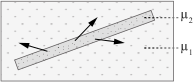
Non-material regions
Non-material regions enable the imposing of boundary conditions (BC).
|
A region of… |
is a BC that enables one to impose… |
It is defined by… |
|---|---|---|
| Normal magnetic field | a normal magnetic field | (predefined) |
| Tangential magnetic field | a tangential magnetic field | (predefined) |
| … on the faces/lines that form the region | ||