
Since version 2026, Flux 3D and Flux PEEC are no longer available.
Please use SimLab to create a new 3D project or to import an existing Flux 3D project.
Please use SimLab to create a new PEEC project (not possible to import an existing Flux PEEC project).
/!\ Documentation updates are in progress – some mentions of 3D may still appear.
Line: about
Lines
Lines can be created:
- manually (choice of line type: segment, arcs, and entering extremity points)
- by propagation from existing lines with the aid of transformation
- by extrusion from existing points with the aid of transformation
- within the propagation or extrusion from other entities
Circle arcs
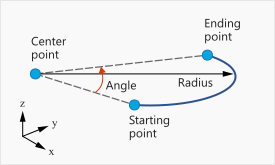
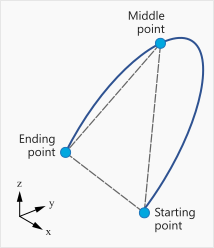
The circle arc can be defined:
- in a coordinate system
- by three points
| Arc defined in a coordinate system | Arc defined by three points |
|---|---|
 |
 |
|
An arc
|
An arc
|
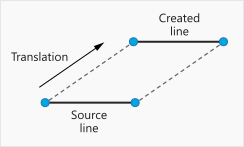
Line defined by propagation
A line can be created by propagation from an existing line with the aid of a transformation.
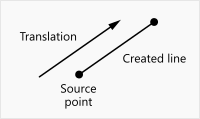
Line defined by extrusion
A line can be created by extrusion from an existing point with the aid of a transformation.
Nature of lines
Flux allows the user to modify the consideration of entities in building algorithms for faces and mesh.
A specific feature, called nature, is attached to the lines. There are some examples of nature attribute using in section Geometry building module of chapter Geometry: principles.