
Since version 2026, Flux 3D and Flux PEEC are no longer available.
Please use SimLab to create a new 3D project or to import an existing Flux 3D project.
Please use SimLab to create a new PEEC project (not possible to import an existing Flux PEEC project).
/!\ Documentation updates are in progress – some mentions of 3D may still appear.
Automatic mesh generator
Definition
This mesh generator, based on the Delaunay method, is the basic mesh generator in Flux.
It permits the meshing :
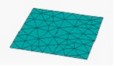
- in triangles, of any face, starting from the meshed lines of the face contour
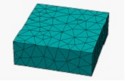
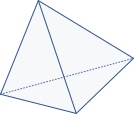
- in tetrahedrons, of any volume, starting from the meshed faces of the volume.
The mesh refinement is controlled by the node distribution on the boundary contours.
Use
This mesh can be used in all situations (complex shapes, etc.). It is robust, simple and fast to use. It ensures low distortion of triangles and tetrahedrons.
Limitation
This mesh generator generates more elements than a mapped mesh generator.
Example
The meshing of a face and of a volume by means of an automatic mesh generator is illustrated in the figure below:
|

|
|
 |
| Triangle | Tetrahedron | ||
Optimisation for the automatic mesh
There are algorithms that permit automatic meshing
- face mesh regularization
- automatic volume meshing Delaunay method/advancing front method
- Mesh optimization for volumes
These optimization algorithms are presented in detail in section Automatic mesh parameters (options) .