
Since version 2026, Flux 3D and Flux PEEC are no longer available.
Please use SimLab to create a new 3D project or to import an existing Flux 3D project.
Please use SimLab to create a new PEEC project (not possible to import an existing Flux PEEC project).
/!\ Documentation updates are in progress – some mentions of 3D may still appear.
Linked mesh generator
Définition
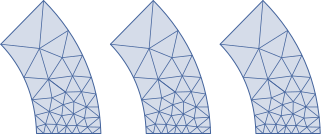
The linked mesh generator allows the user to impose the same meshing on all the linked faces by means of a geometric transformation. This means that the meshing of the base face is copied on the linked faces.
Illustration
The meshing of three faces by means of a linked mesh generator is illustrated in the figure below.
| Linked mesh on the two right faces by means of a linked mesh generator defined by a transformation of translation type |
|---|
 |
Use
The linked mesh generator is used to :
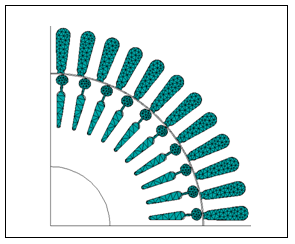
- accelerate and parameterize the meshing of repetitive 2D structures. This function is very useful for the meshing of motor slots.
- diminish the meshing noise on the results by taking advantage of the device symmetries
The linked mesh generator must necessarily be used to apply conditions of periodicity on the faces in the 3D models. A periodicity condition requires having the same number of nodes on the linked faces.
Limitation
This mesh generator can be used only on faces.
| Linked mesh of rotor and stator slots of a motor | |
|---|---|
| This motor is described in detail by the technical paper “End winding characterization with Flux 3D”. |
|