
Since version 2026, Flux 3D and Flux PEEC are no longer available.
Please use SimLab to create a new 3D project or to import an existing Flux 3D project.
Please use SimLab to create a new PEEC project (not possible to import an existing Flux PEEC project).
/!\ Documentation updates are in progress – some mentions of 3D may still appear.
Infinite box: about
Principle of use
If the study domain is limited using the infinite box technique, the infinite box must be attached to the study domain. There is only one infinite box per study domain.
The boundary conditions on the corresponding boundaries of the infinite box are set automatically in the physical module.
Infinite box 2D domain:
The infinite boxes available for 2D study domain and their characteristics are presented in the table below.
| Infinite box | Characteristics |
|---|---|
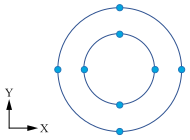
|
disc:
|
Parameter setting
Dimensions of the infinite box are defined using algebraic expression. The algebraic expression can contain:
- constants
- geometric parameters (created beforehand)
- basic mathematical functions using operators : +, -, *, /, ( )
- usual mathematical functions admitted by Fortran.
The mathematical functions are described in section Functions.