
Attachments
Introduction
Documents can be attached to User’s libraries. This allows quick access to the
additional information to describe these libraries.
Note: Documents can be attached only to user’s libraries.
Note: Documents can be linked to libraries as well as to parts.
See chapter Management of parts.
How to create an attachment?
 |
|
|---|---|
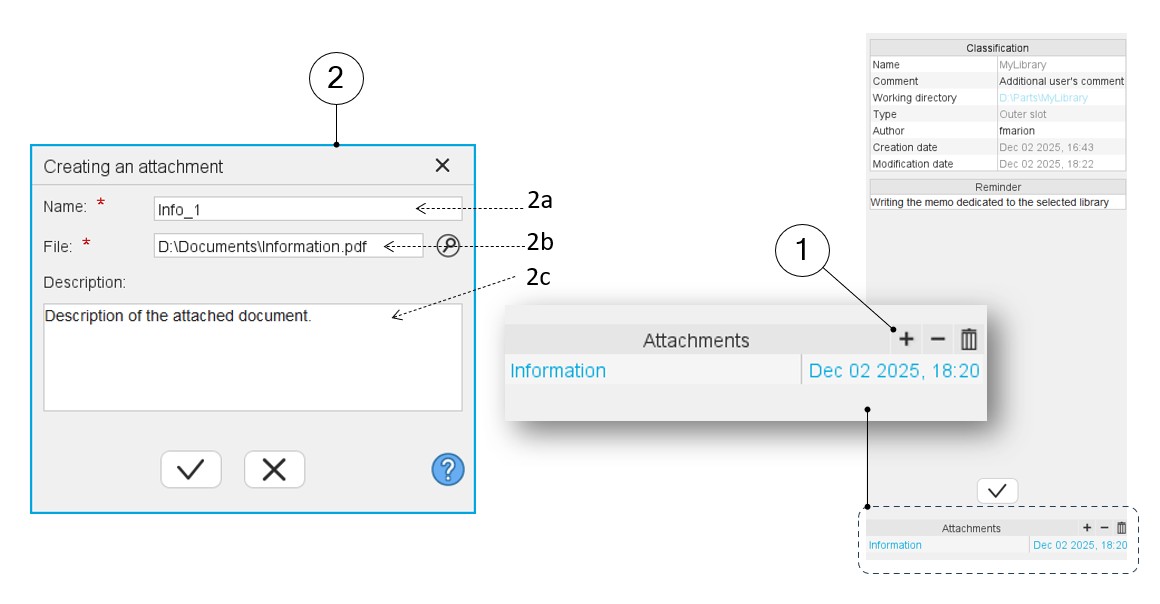
| 1 | Button (+) to add an attached document. |
| 2 | A dedicated dialog box allows adding a new attached
document. All kind of documents can be attached (like Word, Excel, PDF or text files, pictures etc.). |
| 2a | Give the attached document name. |
| 2b | Select the folder in which the document to be attached is stored. |
| 2c | It is possible to write a reminder dealing with the attached document. |
Management of attachments
 |
|
|---|---|
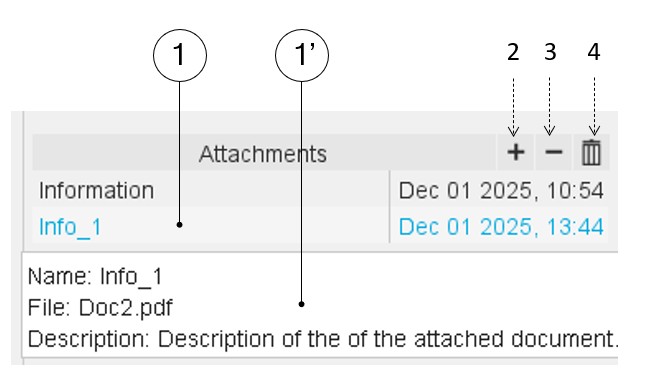
| 1 | Selection of an attached document. Once selected, a tooltip (1’) reminds the name and the description of the selected document. |
| 2 | Button (+) to add an attachment. |
| 3 | Button (-) to remove one or several attachments. |
| 4 | Button for removing all the attached files. |