
Since version 2026, Flux 3D and Flux PEEC are no longer available.
Please use SimLab to create a new 3D project or to import an existing Flux 3D project.
Please use SimLab to create a new PEEC project (not possible to import an existing Flux PEEC project).
/!\ Documentation updates are in progress – some mentions of 3D may still appear.
Symmetry: about
Symmetries attached to the study domain
If the model device is characterized by possible symmetries, those can be attached to the study domain.
The boundary conditions on the corresponding boundaries are imposed in the Physical module.
Symmetry axes: 2D domain
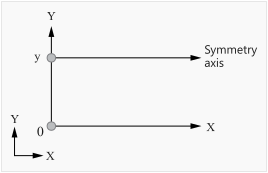
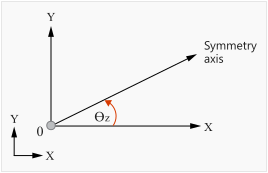
The symmetry axes can be:
- either axes parallel (X, Y) to the main axes (OX, OY)
- or an tilted axis that forms an angle with the main axis OX and passing by the origin of the coordinate system of the study domain
 |
|
|
Symmetry axis
|
Symmetry axis
|
Symmetry and infinite box
It is possible to combine infinite box and symmetries. In this case, the geometry of the infinite box (points and lines) automatically follows the symmetries attached to the study domain.
The rules to be respected are presented in the table below.
| Domain | Rule |
|---|---|
| 2D | the axes of symmetry have to correspond to the main axes of the coordinate system of the study domain (X and Y) |
Example: 2D domain
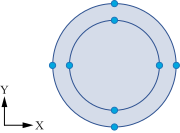
The examples of the infinite box geometry for the study domain with no symmetry and with the symmetries are presented in the table below.
| no symmetry | symmetries |
|---|---|
 |
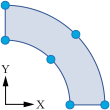 |
| Complete infinite box of disk type | A quarter of the infinite box of disk type for symmetries versus X and Y axis |