
Since version 2026, Flux 3D and Flux PEEC are no longer available.
Please use SimLab to create a new 3D project or to import an existing Flux 3D project.
Please use SimLab to create a new PEEC project (not possible to import an existing Flux PEEC project).
/!\ Documentation updates are in progress – some mentions of 3D may still appear.
Optimization options
Introduction
In the data tree of Flux the node Solver > Optimization > Optimization Options allows the user to set the different options for the optimization algorithm.
The table in the next section summarizes all the optimization options.
General optimization options
| Option | Required informations |
|---|---|
| Optimization tolerance (in percent) | Stops the optimization process when the objective value varies
(d) less than the tolerance value between two
iterations.Default value = 0.5%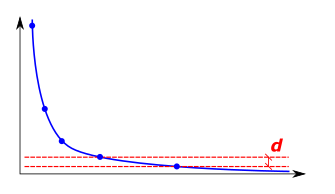 |
| Open a Flux with the final design when optimization is done |
|
| Maximum number of iterations | Stops the optimization process when the maximum number of
iterations is reached if the convergence was not met.Default
value = 30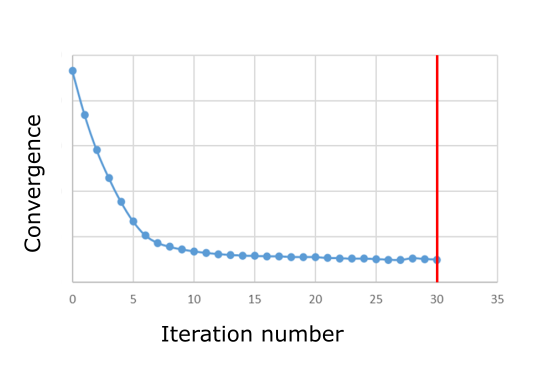 |
| Number of iterations before remeshing | Defines the number of iteration to complete before remeshing the design parts. Allows to improve the optimization by adding nodes and elements when these become of too poor quality following displacements. |
| Move limit | Define an area where the nodes can move, this area may be defined
by:
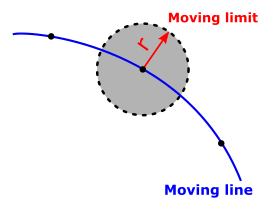 |
| Sensbilities filter | Define an area where the nodes will move in an average direction
composed of each node directions, this area may be defined as:
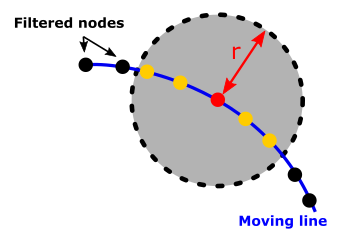 |
| Tolerance for the barriers | This tolerance is used to control how close the lines of the
final design can be. 0.5 meaning half of a mesh size.Default
value = 0.1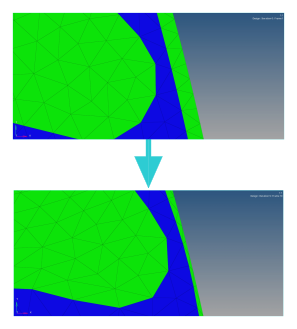 |
Free-Shape optimization options
| Options | Required informations |
|---|---|
| Maximum number of iterations | Stops the optimization process when the maximum number of
iterations is reached if the convergence was not met.Default
value = 30 |
| Number of iterations before remeshing | Defines the number of iteration to complete before remeshing the design parts. Allows to improve the optimization by adding nodes and elements when these become of too poor quality following displacements. |
| Move limit | Define an area where the nodes can move, this area may be
defined by:
|
| Sensbilities filter | Define an area where the nodes will move in an average
direction composed of each node directions, this area may be
defined as:
|
| Tolerance for the barriers | This tolerance is used to control how close the lines of the
final design can be. 0.5 meaning half of a mesh size.Default
value = 0.1 |