Since version 2026, Flux 3D and Flux PEEC are no longer available.
Please use SimLab to create a new 3D project or to import an existing Flux 3D project.
Please use SimLab to create a new PEEC project (not possible to import an existing Flux PEEC project).
/!\ Documentation updates are in progress – some mentions of 3D may still appear.
Constraints
Introduction
In the data tree of Flux the node Solver > Optimization > Constraints allows
the user to define some constraints which are structural or physical limitations
imposed by the optimizer, a constraint allow the user to control the shape of the
design with some symmetries constraints, volume values constraints or physical
limits. The short list of the constraints is given below:
| Constraints | Required information |
|---|---|
| Physical constraint |
|
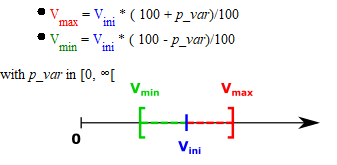
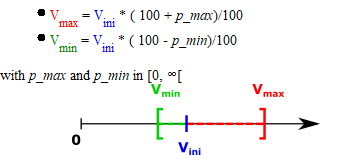
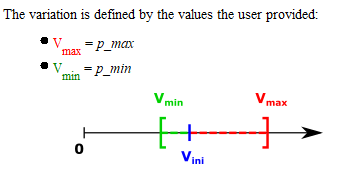
| Constraints on 2D faces volume |
|
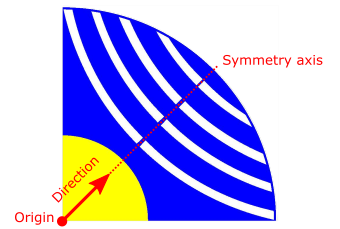
| Symmetry constraint (defined by direction) |
 |
| Symmetry constraint (defined by angle) |
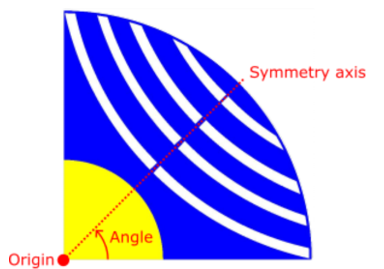 |
| Double symmetry constraint (defined by direction) |
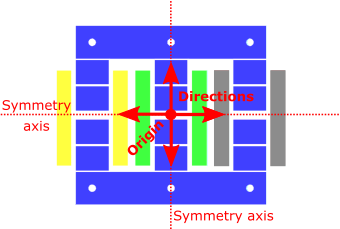 |
| Double symmetry constraint (defined by angle) |
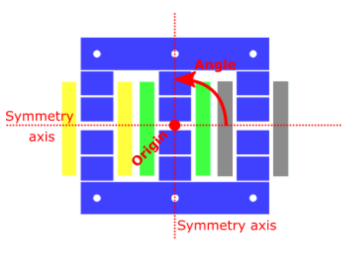 |