Since version 2026, Flux 3D and Flux PEEC are no longer available.
Please use SimLab to create a new 3D project or to import an existing Flux 3D project.
Please use SimLab to create a new PEEC project (not possible to import an existing Flux PEEC project).
/!\ Documentation updates are in progress – some mentions of 3D may still appear.
Concepts of propagation and extrusion
Introduction
To facilitate the geometrical description, various tools for automatic construction are proposed.They allow the duplication of repetitive geometrical patterns, or the fast construction of structures presenting symmetries...
Using the Flux vocabulary we speak about construction by propagation or extrusion. These concepts are clarified below.
Propagation, extrusion: definition
The basic idea is to automatically generate new objects, based on the objects already created (points, lines, faces) by using transformations ; transformations are geometrical functions of translation, rotation, or affinity type.
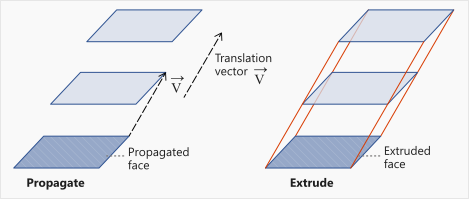
At the vocabulary level, we speak about propagation when the created objects (images) are not connected to the basic objects (sources) and about extrusion when these objects are connected among them by connection elements. The connection elements can be of rectilinear or curvilinear type (straight segments or circle arcs).
These concepts are illustrated in the example below.
Example
In the figure below, the basic face, a rectangle, is propagated/extruded using a transformation of vectorial translation type.
- The propagation automatically generates 2 new rectangles (4 points and 4 lines).
- The rectilinear extrusion automatically generates 2 new rectangles (4 points and 4 lines) as well as 8 connection elements (8 straight lines).