
Export
How to export a catalog?
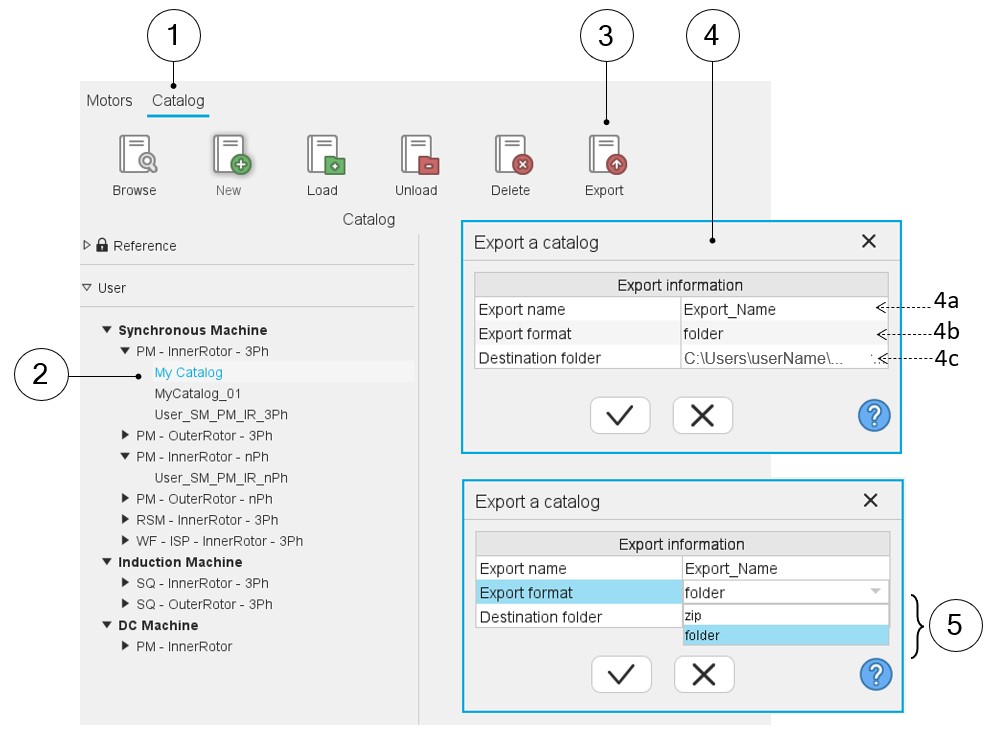
How to export a catalog is illustrated below.
 |
|
|---|---|
| 1 | Selection of the catalog area of the Motor Catalog application. |
| 2 | Selection of the catalog to export. |
| 3 | Button to Unload the selected catalog. |
| 4 | Dialog box to provide information for exporting the selected catalog. |
| 4a | Name given to the exported catalog. |
| 4b | Format in which the catalog will be stored (zip or folder) |
| 4c | Folder in which the exported catalog will be stored. |
| 5 | The export format can be either a zip file or a folder. |